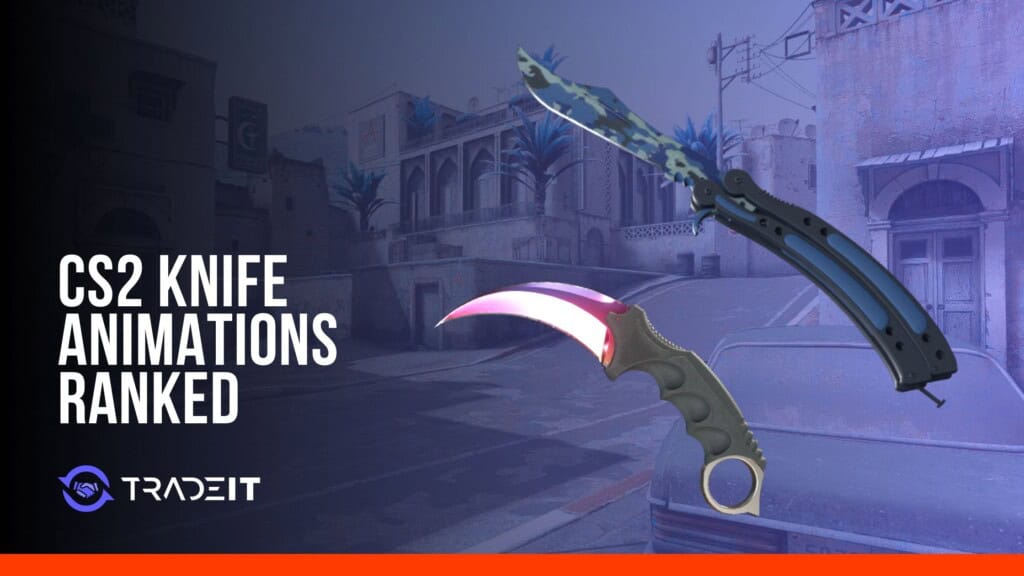


Short answer: we would choose Butterfly for its animations, followed by Karambit and Kukri. Butterfly flips its handles around the blade; Karambit spins around a finger ring; Kukri has two throw-and-catch draws. We rank all 20 collectible models below, including what happens during the draw, inspect and attacks, plus the less common variants.
An inventory preview only shows part of a knife’s appeal. In a match you will draw it, swap away, draw it again and sometimes inspect it. If those repeated movements bother you, an expensive finish will not fix them. It is worth choosing the animation set before paying extra for the paint.
CS2 has 20 collectible cosmetic knife models, excluding the default CT and T knives. The knife model determines its animation set; an overall knife comparison also considers finish choice and price.
We put more weight on the movements you get regularly than on a rare trick. A distinct draw, an active inspect and a clear view of the blade all count in the ranking. Alternate animations can move a model up, but do not decide everything. Some budget knife skins use the same animations as much more expensive finishes on the same model.
CS2 Knife Animation Tier List at a Glance
S tier is where we put the most distinctive ordinary draws and inspections. A tier has impressive moments that are often less frequent. B tier offers a particular movement we like without the same variety; C and D are the more restrained choices.
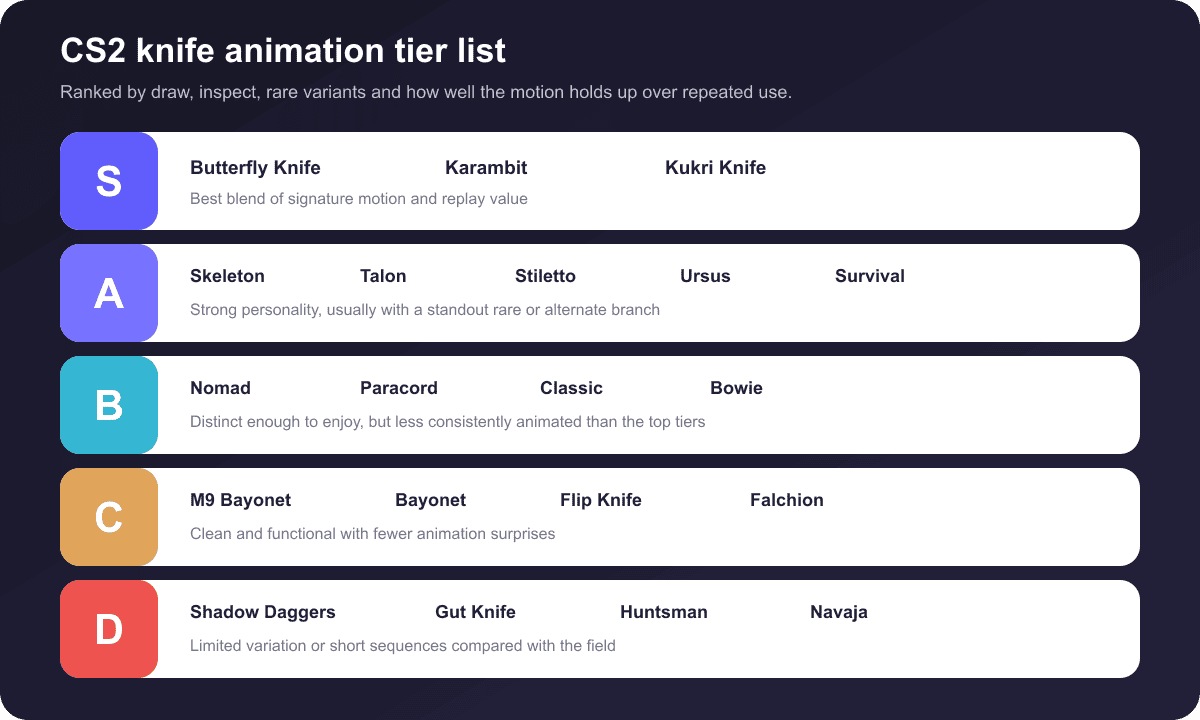
| Tier | Knife | Signature Animation | Rare or Alternate Highlight |
|---|---|---|---|
| S | Butterfly Knife | Multi-step balisong flips | Signature appeal is built into normal draw and inspect |
| S | Karambit | Finger-ring spin into reverse grip | Extended spin behavior during inspect |
| S | Kukri Knife | Throw-and-catch deploy | Two pull-out presentations |
| A | Skeleton Knife | Finger-loop rotation | Rare spinning draw and extended inspect |
| A | Talon Knife | Heavy finger-ring rotation | Sustained spinning inspect |
| A | Stiletto Knife | Fast switchblade snap | Throw-and-catch inspect |
| A | Ursus Knife | Compact toss movement | Rare juggling-style sequence |
| A | Survival Knife | Forward-grip presentation | Alternate spinning pull-out |
| B | Nomad Knife | Folding blade deployment | Finger-cut and flinch draw |
| B | Paracord Knife | Utility-style handling | Rare toss draw and alternate flip |
| B | Classic Knife | Old-school Counter-Strike draw | Alternate inspect sequence |
| B | Bowie Knife | Heavy downward rotation | Large blade dominates the inspect |
| C | M9 Bayonet | Heavy military-style draw | Restrained alternate movement |
| C | Bayonet | Clean spin into the hand | Simple classic inspect |
| C | Flip Knife | Mechanical folding-blade opening | Compact inspection |
| C | Falchion Knife | Compact flip and rotation | Rare hand-balance inspect |
| D | Shadow Daggers | Dual-blade deployment | Distinctive paired handling |
| D | Gut Knife | Short hooked-blade draw | Minimal inspect variation |
| D | Huntsman Knife | Quick spin into the hand | Draw is stronger than inspect |
| D | Navaja Knife | Compact folding-blade flick | Short, restrained inspect |
S-Tier: The Best CS2 Knife Animations
The top three deliver recognizable movement without forcing you to wait for a rare trigger. Their premium finishes can also sit among the most expensive CS2 knives, so it makes sense to settle the animation preference before choosing a finish.
Butterfly Knife
Best overall animation set. Watch the handles as Butterfly comes out: they rotate around the blade through several steps before it settles into the hand. Inspecting keeps those flips going. We put it first because that movement is part of ordinary handling, not just something that occasionally appears in a rare sequence. Butterfly Knife finishes stay in motion through those familiar flips.
Karambit
Karambit rotates into a reverse grip when drawn, leaving the curved blade below the hand. During inspect, the ring lets it spin around the index finger. It is a much more contained movement than Butterfly’s handle flips, so we would choose it if the busier balisong feels distracting. Bright Karambit finishes emphasize the curve as it rotates.
Kukri Knife
Kukri earns its place for the draw. There are two throw-and-catch pull-outs, and the broad curved blade stays visible through much of each movement. Its inspect is not as elaborate as Butterfly or Karambit. We still put it in S tier because switching to it gives you more variety than a single simple pull-out.
Seen the S-tier animations?
Our Butterfly, Karambit and Kukri listings can be compared by finish, pattern and wear.
A-Tier Knife Animations
The A-tier knives have some of our favorite individual sequences. The catch is how often you see them: the ordinary draw or inspect can be much plainer than the alternate version.
Skeleton Knife
Skeleton’s handle opening becomes a finger loop in its spinning animations. The special draw and extended inspect move the blade around that opening, unlike a normal fixed-blade inspection. We like those sequences a lot. The ordinary draw is much quieter, which leaves Skeleton just below S tier rather than matching Butterfly’s regular activity. The exposed blade gives colorful Skeleton Knife finishes room to stand out.
Talon Knife
Talon is the other ring knife to compare with Karambit. Its larger shape gives the finger rotation a heavier appearance, and the special inspect can keep spinning while you hold the input. The blade remains easy to see through the rotation. We prefer Karambit’s regular handling, but Talon’s sustained spin is a strong reason to choose it instead.
Stiletto Knife
Stiletto snaps a narrow switchblade out of its handle. That ordinary draw is brief, especially beside Butterfly or Kukri. The rare throw-and-catch inspect then adds a much larger movement without changing to a bulky model. We like the contrast, particularly if you want a small knife with more to it than a simple opening flick.
Ursus Knife
The regular Ursus handling does not suggest much excitement. Its alternate sequences are another matter, tossing and juggling the blade before it returns to the hand. That difference is why it sits in A tier: the unusual movements are memorable, but you cannot expect them every time you equip or inspect it.
Survival Knife
Survival ends its draw in a normal forward grip. The alternate pull-out takes a larger vertical spin on the way there, which is the movement that earns it this spot. Inspecting is less involved. For an animation comparison, watch the two draws side by side rather than judging it only from the knife sitting in the hand.
B-Tier Knife Animations
B tier is less active overall. There may be a memorable rare draw or a strong visual theme, but we find fewer movements worth choosing the knife for.
Nomad Knife
Nomad’s unusual draw looks like a small accident. The hand catches the opening blade, flinches away and then recovers. It is easy to recognize because the ordinary folding-knife draw has no such reaction. We put it in B tier: the flinch is a memorable extra, but most handling is much less eventful.
Paracord Knife
Paracord mostly behaves like the utility knife it resembles. The normal movements are quick and plain, with a rarer toss-and-catch draw and a more active alternate inspect adding variety. If those extra sequences are the reason you like it, watch the standard ones too. They are what keep Paracord in B tier for us.
Classic Knife
Classic is the nostalgia choice. The shape and handling recall the older Counter-Strike knife, with an alternate inspect providing a little variation. You do not get the juggling or sustained ring spins seen higher up. Someone attached to that old look might put it first; judging movement alone, we leave it in B tier.
Bowie Knife
Bowie makes its movements noticeable through sheer size. The broad blade rotates down into the hand, then takes up plenty of the view during inspection. There is no defining rare juggling trick here. We rank it for the way that large blade moves and displays a finish, not for a complicated animation set.
C-Tier and D-Tier Knife Animations
These knives can still be excellent cosmetic choices. Their lower placement only means they offer less movement variety than the models above them.
M9 Bayonet
M9 pulls a large military-style blade into view without much flourish. Once you inspect it, the movement is quieter than on knives built around finger spins or tosses. That is not necessarily a drawback if you want to look at the finish rather than watch a trick. M9 Bayonet finishes make use of its broad blade rather than an elaborate inspect loop.
Bayonet
Bayonet’s draw is the part we like most: the blade rotates neatly into the hand, then settles without an extended flourish. Its inspect does much less. It is a good fit if you want one satisfying movement during a weapon switch, but not our pick for anyone looking for rare tricks or long loops.
Flip Knife
Flip opens its folding blade quickly, then turns the small model during inspection so you can see the finish. There is no major rare sequence that transforms the experience. We would choose it for that compact opening movement rather than for animation variety. Flip Knife finishes suit buyers who prefer a compact model to a long flourish.
Falchion Knife
Falchion’s balancing inspect is its highlight. Instead of just rotating the blade to view it, the hand balances the knife across it. The ordinary draw and inspect are much plainer, so that one sequence does not lift Falchion above C tier for us. It could still be your favorite if the balancing trick is exactly what you want.
Shadow Daggers
Shadow Daggers put a blade in each hand, something no other collectible knife model here does. That makes even their idle pose and attacks recognizable. The inspect itself is not especially involved, though. We put them in D tier for movement variety, while recognizing that the paired look can be reason enough to buy them.
Gut Knife
Gut Knife draws its hooked blade quickly and then offers a fairly restrained inspection. There is not much sustained motion to watch. That leaves the paint and blade shape doing most of the work, so it makes more sense to compare finishes and price than to buy it for its animations. A distinctive Gut Knife finish can provide the visual interest instead.
Huntsman Knife
The Huntsman Knife animation in CS2 is mainly about the draw. The blade spins quickly into the hand, then the inspect is much less active. It lacks the extended ring rotations and juggling sequences of higher-ranked knives. We like that first spin, but not enough to move Huntsman out of D tier in an animation-only list.
Rare and Hidden CS2 Knife Animations
A rare animation is another version of the draw or inspect, not an upgrade you buy. Changing the finish, wear, pattern or StatTrak status does not unlock it. The model has to support that sequence, and the game can then select it during the relevant action.
There is no universal “1 in 5” rule for every rare animation. You may see community estimates around that figure for particular draws. They are not a Valve-published rate covering every model and every action. A probability quoted for one rare draw should not be assumed to apply to a different knife’s inspect.
To reproduce a rare draw, repeatedly switch away from the knife and equip it again. For a rare inspect, keep the knife equipped and repeat the inspect command. If the special inspect supports a hold loop, keep the inspect input held once that branch starts.
Nomad Knife
Watch for the deployment where the player catches a finger on the blade, pulls the hand away, and flinches.
Kukri Knife
Its alternate throw-and-catch pull-outs use different presentation angles, giving the deploy visible variation.
Ursus Knife
The special sequence adds rapid tosses and juggling-style manipulation absent from the plain standard handling.
Stiletto Knife
The fast switchblade behavior is joined by a rarer toss-and-catch flourish during inspection.
Talon Knife
Its special inspect can become a sustained finger-ring spin while the inspect input remains active.
Survival Knife
The alternate deploy uses a more pronounced rotation before the blade returns to its normal grip.
Paracord Knife
Look for the alternate toss during deployment and the less common flipping movement during inspection.
Skeleton Knife
The special draw spins the knife, while the extended inspect rotates it through the handle opening.
Rare animation RNG does not create a gameplay advantage. A special draw or inspect changes what you see, not knife damage, reach, hit registration, or competitive effectiveness.
New CS2 Knife Animations from the Third-Person Update
One of the major 2026 animation changes was Valve’s move to Animgraph 2. The beta began on April 1, 2026, with Valve stating that third-person animations had been re-authored and that several were adjusted in response to player feedback.
For someone buying a knife, the important distinction is the viewpoint. Animgraph 2 reworked how characters and weapons move in third person. It did not give every cosmetic knife a replacement first-person inspect. Separate fixes and smaller viewmodel changes followed the broader system update.
Missing knife draws were added during the beta. When the update went live on April 20, the notes also covered deployment, smaller viewmodel changes and the transition from one knife attack to another. Later fixes corrected where Talon and Karambit sit during a defuse and adjusted finger movement on Bayonet. None of those fixes introduced a collectible knife type.
The phrase new CS2 knife animations can mean two different things here. For a purchase, compare the first-person draw and inspect you will see yourself. For Animgraph 2, the main subject is the character animation seen by other players and spectators.
Ready to trade for the knife you want?
Pick an existing knife, or put skins from your inventory toward a trade. The confirmation screen is where to check the quoted price and that copy’s restrictions.
FAQ
What is the best CS2 knife animation overall?
Butterfly is our first choice because its regular draw and inspect already flip the handles around the blade. For a smaller ring spin, we prefer Karambit. Kukri is the alternative if you care most about varied throw-and-catch draws.
Do all CS2 knives have rare inspect animations?
No. One model may have a special draw but little inspect variety; another may offer alternate versions of both. Some mostly stick to their standard movements. Check the particular knife rather than assuming every model has a hidden inspect.
How do I trigger a rare knife inspect animation?
Keep the knife equipped and repeat the inspect input, provided that model has an alternate inspect. A rare draw requires equipping the knife again instead. Buying a different float, pattern, finish or StatTrak copy will not guarantee either sequence.
Do knife animations affect gameplay or hitbox?
No. A Karambit spin and a heavy M9 draw look different, but the cosmetics do not change the melee damage, reach or hitbox. Paying for a different animation will not buy a combat advantage.
Which CS2 knife has the fastest draw animation?
Stiletto’s short snap or Bayonet’s simple rotation may look quicker than a long Butterfly flourish. That is a visual comparison, not a claim that either lets you attack sooner. The best choice is the draw you like seeing repeatedly.
Does the Huntsman Knife still have unique animations after the CS2 update?
Yes, Huntsman still has its recognizable spin into the hand. The Animgraph 2 work in 2026 chiefly concerned third-person movement and animation logic; it was not a replacement of every knife’s first-person draw and inspect.
Are knife animations different in first-person and third-person view?
Yes. Your own draw and inspect use the first-person viewmodel. Someone else watching your character sees third-person movements instead. Valve’s 2026 Animgraph 2 overhaul addressed that broader third-person system.
Did Valve add new knife animations after 2024?
Yes. Animgraph 2 arrived in 2026 and brought re-authored third-person movements. Other fixes addressed drawing knives, moving between attacks and the position of particular models. That does not mean every existing knife received a new first-person inspect, or that Valve added another collectible model.
How can I get one of these knives in CS2?
CS2 knives can be bought, traded, opened from eligible cases or produced through an eligible five-Covert contract. Our knife catalogue lets you choose a specific model and finish without a random result.