
Getting kicked from a match in CS2 with the message “Kicked for input automation” can be confusing, especially if you are not using any cheats or obvious macros.
In most cases, this kick is triggered by modern keyboard features or software that the game interprets as automated input behavior.
This article explains what the message means, why it happens, and how to fix it.
What Does the CS2 Input Automation Kick Mean?
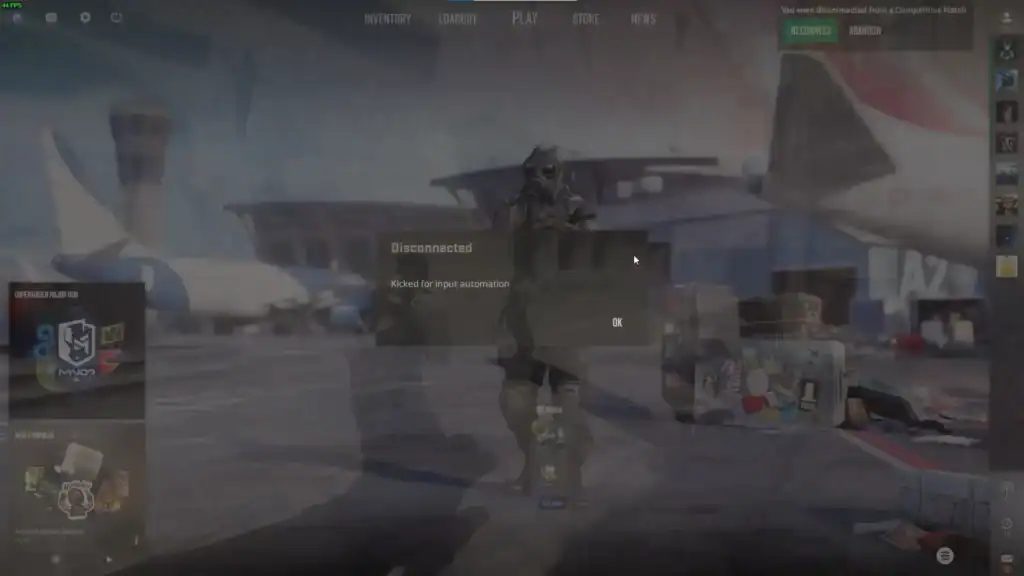
The “input automation” kick in Counter-Strike 2 is a server-side protection system that detects inputs that look artificially generated or too consistent to be human.
It does not necessarily mean you are cheating. Instead, it means the game detected patterns similar to macros, scripting, or SOCD-style input manipulation.
Does Getting Kicked for Input Automation Affect Your CS2 Account?
In most cases, no permanent penalty is applied. This is important:
This issue is usually a short-term kick, not a permanent ban.
Your CS2 account is not automatically flagged or penalized by VAC.
You can rejoin matchmaking after resolving the input issue.
However, repeated kicks may make matchmaking unstable or restrict your ability to queue until resolved.
Why CS2 Kicks You for Input Automation
There are several common causes behind this detection.
SOCD Detection – Simultaneous Opposing Cardinal Directions
One of the most frequent triggers is SOCD behavior (Simultaneous Opposing Cardinal Directions), where inputs like A + D are resolved in a way that produces unnatural movement patterns.
Some modern keyboards include:
Features that automatically resolve opposing directional inputs, which can appear unnatural in CS2.
Keyboard logic that decides which key input takes precedence during simultaneous presses.
Advanced keyboard firmware features that can simulate or refine movement inputs automatically.
Even though these are built into keyboards, CS2 may still flag them as automation.
Keyboard Firmware Features Flagged as Automation
High-end gaming keyboards often include advanced features such as:
Enables extremely fast key reset and re-actuation for quicker movement responsiveness.
Lets players customize how far a key must be pressed before registering input.
Mimics analog movement behavior, allowing smoother or variable input control.
Assigns multiple functions to a single key depending on press depth or trigger state.
These features can produce input timing that appears “too perfect” or non-human, which may trigger kicks.
Background Macro or Script Software
Another common cause is software running in the background, such as:
Custom scripts that can automate key presses or sequences, sometimes triggering input detection.
Programs that record and replay inputs, which can resemble automated gameplay behavior.
Peripheral software that sometimes includes hidden macro or key-binding automation layers.
General automation software that can unintentionally interfere with game input detection.
Even innocent scripts (like key remaps or hold-to-repeat functions) can cause detection.
How to Fix the CS2 Input Automation Kick
If you are being kicked repeatedly, follow these steps to resolve the issue.
Fix 1 – Disable SOCD Resolution in Your Keyboard Software
Turn off any features related to:
Mechanisms that resolve opposite directional inputs to produce a single clean movement output.
A feature where the latest directional input automatically overrides the previous one for instant switching.
Logic systems that determine how multiple keys pressed at the same time are interpreted by the device.
This is the most common fix for modern gaming keyboards.
Fix 2 – Disable Rapid Trigger or Advanced Input Features
If your keyboard supports it, disable:
Allows keys to reset and re-activate instantly for faster input responsiveness.
Emulates analog-style input behavior for smoother and more controlled movement.
Lets a single key have multiple activation points for different in-game actions or behaviors.
CS2 is sensitive to extremely precise or layered inputs.
Fix 3 – Update Your Keyboard Firmware
Outdated firmware can cause unexpected input patterns. Make sure to:
Install the latest manufacturer firmware to fix bugs and ensure proper input behavior.
Restore keyboard settings to default if custom configurations are causing issues.
Manually set up your keybinds again after resetting to ensure optimal CS2 performance.
Fix 4 – Close Background Macro and Script Software
Before launching CS2, close any software that could inject or modify input:
Software that records and repeats input sequences, which can unintentionally trigger automation detection.
Custom scripts that simulate or automate inputs, potentially conflicting with CS2 input rules.
External tools that modify key inputs, which may be detected as non-standard or automated behavior.
Even background services can trigger detection.
How to Avoid It Happening Again
To prevent future kicks, keep your setup simple and consistent:
Do not use keyboard or software features that mimic automated or scripted input behavior in CS2.
Use default movement inputs to ensure consistent and detection-safe gameplay behavior.
Do not combine multiple modifiers or advanced input systems that alter natural movement behavior.
Always verify your settings in offline or practice servers before entering matchmaking.
In general, CS2 favors natural input patterns over highly optimized hardware automation systems.
Summary
The “input automation” kick is not usually a punishment. It is a safeguard against unnatural input behavior. Most players experiencing it are using advanced keyboard features without realizing they can conflict with CS2’s detection system.
By disabling SOCD-related features and removing macro layers, you can usually eliminate the issue entirely and return to stable matchmaking.
FAQs
1. What does “Kicked for Input Automation” mean in CS2?
It means the game detected input patterns that resemble automation, macros, or advanced keyboard features rather than natural manual movement.
2. Can I get banned for input automation kicks?
Usually no. It is typically a temporary kick from the server, not a VAC ban or permanent account penalty.
3. What is the most common cause of this issue?
The most common cause is SOCD-related keyboard behavior, such as “Snap Tap” or other movement-clearing features built into modern gaming keyboards.
4. Do macros or scripts always trigger this kick?
Not always, but macro tools, AutoHotkey scripts, or background automation software can significantly increase the risk of being kicked.
5. How do I permanently fix input automation kicks?
Disable SOCD or rapid-trigger features, remove macro software, reset keyboard settings if needed, and ensure CS2 is running with standard input behavior only.