
A smoke key is useful when you’re backing out of a fight and don’t want to cycle through three grenades to find it. A script that jumps and throws for you is a different thing. This list covers the ordinary controls worth putting within reach, with the old automated shortcuts clearly marked to leave out.
Safe means ordinary controls or purchases for official matches. Practice Only means a session you host or have permission to use, sometimes with sv_cheats 1. Entries marked Avoid are blocked combinations or macros that conflict with Valve or FACEIT rules.
Before binding keys in CS2, see what those keys already do and keep a readable copy of the new layout. The useful assignment is one you can reach comfortably.
Quick Reference
Start with the action that keeps getting in your way, rather than replacing every key at once. These are example assignments to adapt. Do not copy the jump-throw row; it shows the kind of script to avoid.
| Purpose | Exact command | Status | What it does |
|---|---|---|---|
| HE grenade | bind "z" "slot6" |
Safe | Selects the HE grenade slot. |
| Flashbang | bind "x" "slot7" |
Safe | Selects the flashbang |
| Smoke | bind "c" "slot8" |
Safe | Equips your smoke grenade if you have one. |
| Fire grenade | bind "mouse4" "slot10" |
Safe | Equips your team’s Molotov or incendiary grenade. |
| Jump | bind "mwheeldown" "+jump" |
Safe | Sends a jump input when the wheel scrolls down. |
| Previous item | bind "q" "lastinv" |
Safe | Returns to the previously held inventory item. |
| Voice module | bind "j" "voice_modenable_toggle" |
Safe | Switches the in-game voice module on or off. |
| Noclip | bind "p" "noclip" |
Practice Only | Flight through map geometry in a permitted local practice session. |
| Jump-throw script | bind "alt" "+jump; -attack" |
Avoid | Combines protected jump and attack actions. |
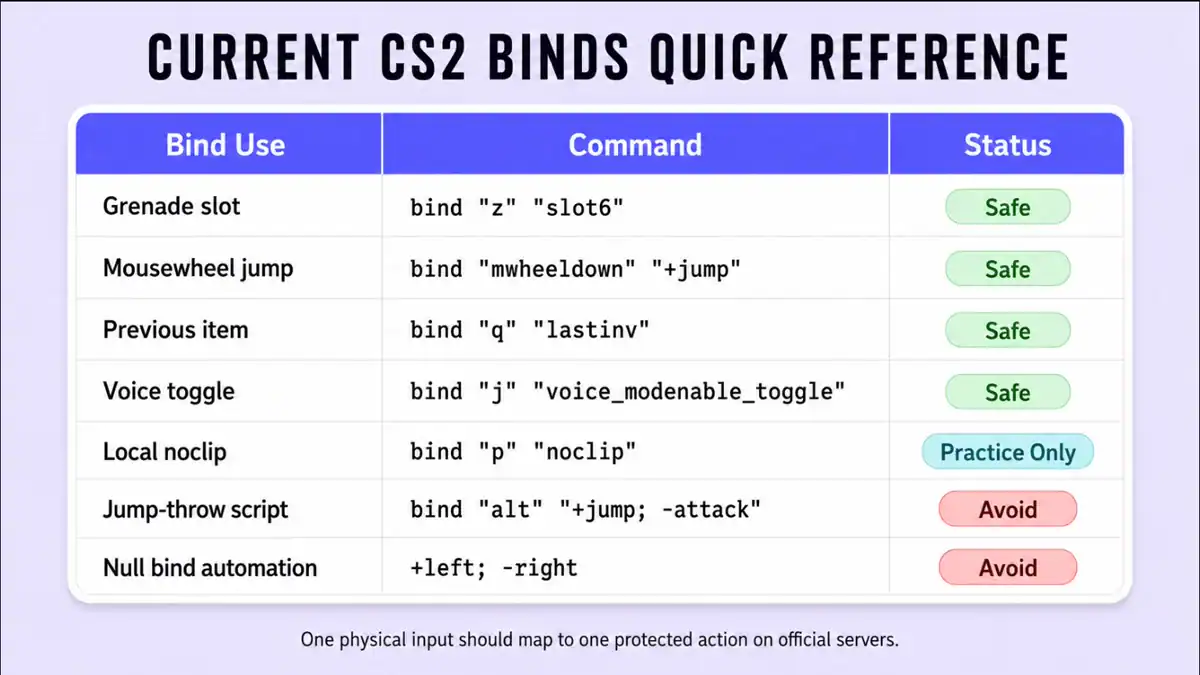
Typing bind "key" tells you what a key currently does. Check that before replacing it with one of these examples. To assign CS2 keys, either use the console or make the change through the keyboard settings menu.
Grenade and Utility Binds
A direct grenade key equips the grenade. That’s all: you still move, aim and release it yourself. Put smoke on a key you can reach without cycling past the flash or HE when you need it quickly.
Core Grenades
bind "z" "slot6"
bind "x" "slot7"
bind "c" "slot8"
slot6 selects an HE grenade, slot7 selects a flashbang, and slot8 selects a smoke.
Decoy and Fire
bind "v" "slot9"
bind "mouse4" "slot10"
slot9 is the decoy slot. slot10 selects the Molotov or incendiary grenade available to your team.
One Side Button
bind "mouse5" "slot8"A side button is only convenient if your grip stays steady while pressing it. If reaching for it moves your aim, put smoke on the keyboard instead.
Used your only smoke already? The smoke key has nothing left to equip. These slot numbers refer to fixed grenade types, not the order you happen to prefer carrying them in.
The key should equip, not throw for you. Combining +jump with -attack supplies both the jump and release from one input. Adding +forward or using -attack2 in the sequence does not make that protected combination acceptable.
Movement Binds
Wheel jump gives you one jump input per notch. Scrolling through several notches gives you more chances to meet the landing timing, but there’s no landing detection in the bind.
Mousewheel Jump with Space Retained
bind "mwheeldown" "+jump"
bind "space" "+jump"
This leaves Space available as well. Prefer scrolling up? Use mwheelup in place of the downward wheel input.
The distinction is what happens when your hand stops. Stop the wheel and you stop sending jump inputs. A bunny-hop macro keeps supplying its timed sequence after one press instead, which is among the advantage-producing external macros FACEIT prohibits.
For switching back to the item you just held, use lastinv:
bind "q" "lastinv"No alias is needed for that. Some longer quickswitch scripts force a knife or do something else on key release. Neither addition is necessary if all you wanted was the item you held before this one.
Keep crouch and jump as your own inputs. CS2 ignores bind "key" "+jump; +duck" by default because it bundles two protected movement actions into one key.
Buy Binds
You can put armour on F3 and a kit on F4 to avoid reopening the buy menu. Still check what the team is buying before spending. FACEIT permits autobuy configuration; it isn’t treated like a script that performs movement for you.
| Purchase | Exact command | Status | Important condition |
|---|---|---|---|
| Armor and helmet | bind "f3" "buy vesthelm" |
Safe | Requires enough money and an active buying period. |
| Defuse kit | bind "f4" "buy defuser" |
Safe | Only available to the Counter-Terrorist side. |
| Smoke grenade | bind "f5" "buy smokegrenade" |
Safe | Fails harmlessly if unavailable or already at the limit. |
| Flashbang | bind "f6" "buy flashbang" |
Safe | Each time it is pressed it tries to make one purchase. |
| AK-47 or M4A4 | bind "f7" "buy ak47; buy m4a1" |
Safe | Only the valid team and loadout purchase succeeds. |
| AK-47 or M4A1-S | bind "f7" "buy ak47; buy m4a1_silencer" |
Safe | Use this version when the M4A1-S occupies your applicable loadout slot. |
That AK/M4 command tries both purchases. A T can’t buy the M4 and a CT can’t buy the AK, leaving the valid team purchase to succeed if money, buy time and loadout allow it. Grenade limits still apply too. The semicolon isn’t the forbidden part of a bind; combining protected player actions is.
Make sure the F-key isn’t doing something you still need. On a full-size keyboard, the numpad is another place to put purchases without crowding the keys used during a fight.
Audio and Communication Binds
Decide what you want muted. Turning down incoming voice lets you keep making calls; switching off the voice module is broader than that.
Toggle the Voice Module
bind "j" "voice_modenable_toggle"J toggles voice_modenable. This is the voice-module switch, not merely a volume control for the teammates you hear.
Mute Incoming Voice Volume
bind "k" "toggle snd_voipvolume 0 1"K alternates incoming volume between 0 and 1. At 0 you won’t hear the incoming voice, but the voice module itself remains enabled.
Change Microphone Mode
bind "l" "voice_toggle_open_mic"In the ordinary client, this switches between open mic and push-to-talk. Check which mode you left selected before having a conversation away from the match.
The current incoming-volume setting is snd_voipvolume. If an old guide gives you voice_scale, it’s referring to CS:GO. Don’t confuse either volume setting with voice_modenable_toggle, which changes the voice module.
For a quiet clutch, K is the relevant example. It turns down what you hear, leaving the module on so you can still make your own call. J does more than mute the incoming sound. Remember to restore the volume afterward or you’ll miss the next plan too.
Practice and Crosshair Binds
Crosshair display toggles are ordinary client settings you can use in public matches. The training tools below aren’t all in that category. Noclip, position readouts and grenade-practice controls need the appropriate permissions in a session you host or are allowed to practise in.
| Purpose | Exact command | Status | Scope |
|---|---|---|---|
| Follow-recoil crosshair | bind "h" "toggle cl_crosshair_recoil 0 1" |
Safe | Turns the crosshair’s Follow Recoil option on or off. |
| Crosshair visibility | bind "n" "toggle crosshair 0 1" |
Safe | Client-side display toggle. |
| Noclip | bind "p" "noclip" |
Practice Only | Needs local authority and normally sv_cheats 1. |
| Position display | bind "o" "toggle cl_showpos 0 1" |
Practice Only | cl_showpos requires cheat permission. |
| Grenade preview | sv_grenade_trajectory_prac_pipreview 1 |
Practice Only | Use in a permitted local grenade-practice environment. |
Start a local map before enabling practice permissions. A minimal setup can begin with:
sv_cheats 1
bind "p" "noclip"
sv_grenade_trajectory_prac_pipreview 1
In that setup, noclip is the reason for sv_cheats 1. The grenade preview belongs to the server controls but isn’t itself cheat-flagged. You don’t have authority to turn these training permissions on in Valve matchmaking or an ordinary FACEIT match. A community server’s administrator decides what to allow there.
A separate file for practice-only console commands makes the distinction easier to maintain. Executing it on a competitive server won’t give your account permissions the server hasn’t granted.
Binds That No Longer Work
There are two reasons an old script can fail. CS2 ignores binds containing more than one protected movement or attack action by default. Valve’s Side-stepping Skill policy also prohibits automating multiple player actions from a single input on official servers, where detection may result in a kick.
The protected list covers attack and secondary attack, forward, back, left, right, jump, duck, reload, use and zoom, as well as turning, strafing, looking and related movement axes. Spelling each command correctly won’t help if the problem is the combination.
Jump-Throw and Run-Throw Binds
A jump-throw script supplies both the jump and the grenade release from one key. Add forward movement and you have the running version. These are examples to remove from an official-match config, not copy into one:
bind "alt" "+jump; -attack"
bind "alt" "+forward; +jump; -attack"
Moving the sequence into aliases or a chain of exec commands doesn’t make it acceptable. Press the movement and release inputs yourself.
To do it manually, prime the grenade, jump, then promptly release attack. Hitting the intended timing produces a grunt that nearby players can hear too. That’s the confirmation to listen for. Valve designed reliable jump throws without a script; the jump and release still come from you.
A running throw adds your own forward movement and a chosen jump point. If an old video used a script, its bind isn’t the part to bring into your config. Practise a manual timing cue for the throw instead.
Null Binds and Input Automation
A null bind can release one direction when you press the other. That release is being supplied by the bind, not your finger lifting off the original key. It automates part of counter-strafing; Valve specifically names null binds in the restriction.
alias "+leftnull" "+left; -right"
alias "-leftnull" "-left"
bind "a" "+leftnull"
It needn’t be a CFG to do this. Keyboard features can supply the same automatic direction handling. Turn off Snap Tap, SOCD direction resolution and equivalent input automation before joining Valve’s official servers.
Valve says detection may cause a kick. Don’t turn that into a claim that every incident automatically earns a VAC ban. The reverse isn’t true either: getting through a match without a kick doesn’t make the bind valid. Protected combinations remain ignored by default.
The setting cl_allow_multi_input_binds 1 is cheat-protected. It belongs in an appropriate local test, not a workaround for Premier, Competitive, Casual, Wingman, Deathmatch or FACEIT rules.
Valve Official
Stick to ordinary one-action controls. CS2 ignores protected multi-action binds by default, and detecting hardware or script automation may get you kicked.
FACEIT
Autobuy and other ordinary CFG changes are allowed. Advantage-producing external scripts and macros aren’t: FACEIT gives bunny-hop and no-recoil macros as examples, not a complete list.
Local Practice
When you host the session, sv_cheats 1 can enable cheat-protected tools for practice. Joining a competitive server doesn’t bring that permission along with you.
Keep the parts of your layout you still use. To remove an old script, find its bound key and follow the aliases it calls, then remove those entries specifically.
Save Binds in autoexec.cfg
Saving the layout in an autoexec gives you something to check later. If C stops selecting smoke, there’s a line in a file to inspect instead of a console command you vaguely remember typing.
- Create a plain-text file named
autoexec.cfg. Make sure Windows has not silently added a.txtextension. - Place it in
...\Steam\steamapps\common\Counter-Strike Global Offensive\game\csgo\cfg\. - Add one bind per line, using quoted key and command strings.
- Launch CS2 and enter
exec autoexecin the developer console. - Run
key_listboundkeys. Inspect the resulting assignments.
A clean starter file might look like this:
bind "z" "slot6"
bind "x" "slot7"
bind "c" "slot8"
bind "mouse4" "slot10"
bind "mwheeldown" "+jump"
bind "space" "+jump"
bind "q" "lastinv"
bind "j" "voice_modenable_toggle"
Run exec autoexec yourself if loading fails, and read what the console says. A filename error or a bad command may be right there. Steam’s launch options can also include +exec autoexec.cfg. Remember that loading successfully isn’t the end of it: a later command can overwrite the same key.
You don’t have to end the file with host_writeconfig. That command writes configuration state; the autoexec already holds your saved assignments. Keep the custom lines together, and look for conflicts in the menu, Steam Cloud or another CFG if one unexpectedly changes.
Find the assignment first. key_listboundkeys prints the active list. For a single key, bind "key" shows what it does and unbind "key" removes that assignment alone.
key_listboundkeys
bind "f3"
unbind "f3"
That example clears F3 and leaves the other keys alone. Substitute the key you actually want to change, then bind it again if needed. Don’t use unbindall to fix one key: it clears movement and your other controls as well.
Frequently Asked Questions
Are CS2 binds allowed on Valve official servers?
Yes. Selecting a smoke, buying armor, changing voice volume or using lastinv is not the same as scripting a jump and throw together. Ordinary controls, including wheel jump, are allowed. CS2 ignores combined protected actions by default, and detected input automation can result in a kick.
Do jump-throw binds still work in CS2?
Not as an allowed one-key shortcut on Valve official servers. Prime the grenade, jump and release the attack button yourself. Listen for the grunt that confirms the intended timing.
Are manual jump throws reliable?
Yes. Valve designed them to work without special binds, provided you release the grenade within the timing window. You must also move manually for a running throw. An old scripted lineup may need a different timing cue.
Is mousewheel jump safe on FACEIT?
bind "mwheeldown" "+jump" sends one jump per physical wheel input. FACEIT allows ordinary configuration changes but prohibits external advantage-producing macros, including bunny-hop macros. Check any additional tournament rules too.
Why does my buy bind not work when I write it correctly?
A kit bind cannot buy a defuser on T side, for example. Check your team, money, remaining buy time and equipped loadout before changing the syntax. Utility limits still apply. The M4 names also matter: m4a1 buys the M4A4, while m4a1_silencer refers to the M4A1-S.
How do I see every key currently bound in CS2?
key_listboundkeys prints the active list. To inspect just F3, for example, use bind "f3". If that is the unwanted assignment, unbind "f3" clears it without touching your other keys.
Why is my autoexec bind being replaced?
Look for another assignment to the same key. If a later CFG sets C to a different action, it replaces your earlier smoke bind. Check launch options and the Settings menu too. Execute autoexec manually, read any errors and use key_listboundkeys to see what is active afterward.
Can I use noclip or cl_showpos in a real match?
Not in normal Valve matchmaking or FACEIT matches. noclip needs server authority and cheat permission; cl_showpos is also cheat-protected. Use them in local practice with sv_cheats 1, not as competitive-match controls.