As a long-time TF2 player, I love exploring every odd and hidden aspect of the game. One of the strangest finds? A “coconut” file buried in the game’s directories.
If you’re deep-diving into the TF2 files, you might come across this too, and it probably raises a lot of questions. Here’s what I found out and why it’s become such a funny piece of TF2 lore.
Table of Contents
The Coconut File: What Is It?
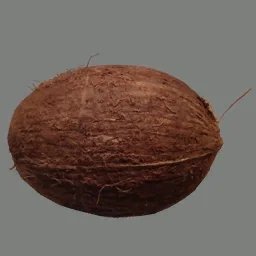
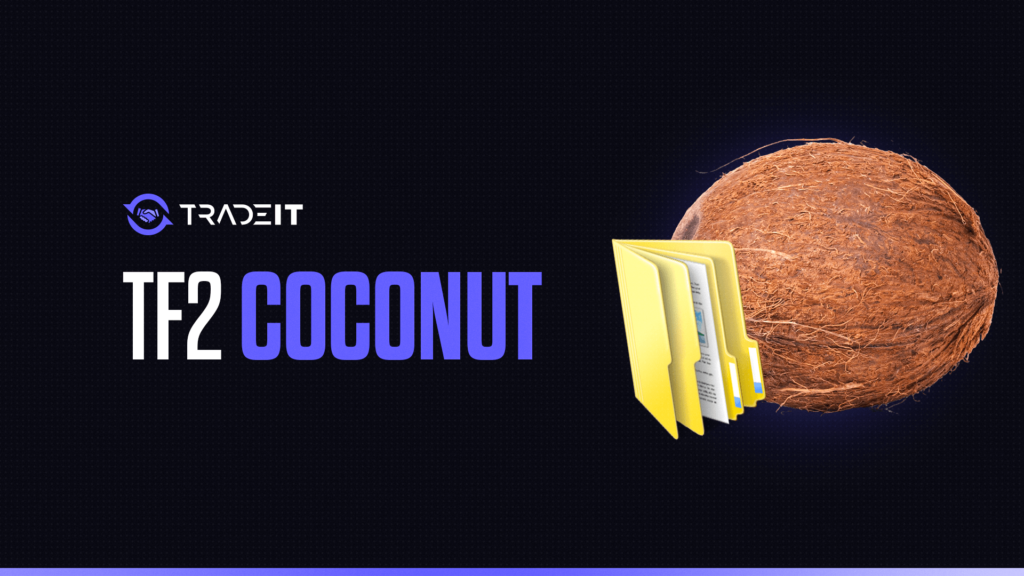
If you’re poking around in TF2’s game files, you’ll find a file called “coconut.vtf” inside the “materials/effects” folder. Now, seeing “coconut” in a game that has no tropical fruit whatsoever is confusing.
For those unfamiliar, a .vtf file stands for Valve Texture File, used specifically in the Source engine for textures.
I opened it using VTFEdit (handy tool if you want to look at Source textures), and sure enough, it’s a realistic-looking image of a coconut. Weird, right? What’s a coconut doing in TF2?
Rumor Time: “Deleting the Coconut Crashes TF2”
There’s this fun rumor in the TF2 community that deleting the coconut file will crash the game. I’ll admit, I was curious. So, I decided to try it myself. I backed up the file (because I like to play it safe), then deleted “coconut.vtf” and launched TF2.
And… nothing happened. The game loaded as usual. So, as cool as the myth sounds, TF2 runs just fine without it. But why does it exist in the first place?
The Backstory
Turns out, the coconut file dates back to TF2’s Love & War update in 2014. This update introduced several new taunts, including the Fresh Brewed Victory taunt, where the Soldier sips coffee from a mug.
Here’s the twist: the coffee beans used in the particle effects were originally going to be represented by this coconut texture!
It seems that Valve initially used the coconut as a placeholder texture, or maybe even a fun Easter egg, but ultimately didn’t end up using it in the final version of the taunt.
So, instead of being deleted, this coconut file just kind of hung around in the game files as an unused texture. And that’s how we got a random coconut file sitting in TF2.
Why Did They Not Remove It?
Unused files aren’t unusual in games, especially ones as old and heavily updated as TF2. Developers sometimes leave assets in the game to avoid accidentally messing with other parts of the code. In this case, the coconut file is harmless.
Deleting it doesn’t seem to impact anything significant, such as agent classes or weapons, but it also doesn’t help much either. So, Valve likely figured it was safer to leave it there than to risk removing it and potentially breaking something.
Community Reactions and Fun Myths
This coconut file has become a funny little legend in the TF2 community. Some players joke about it being the secret ingredient keeping TF2’s code intact, while others like to pretend it’s some hidden Easter egg with a purpose that nobody has discovered yet.
But, from my digging, it’s just an unused texture that Valve forgot to delete or chose to leave alone.
Understanding the Difference Between the Meme and the Texture
In the TF2 community, the terms coconut.jpg and coconut.vtf often get confused, but they refer to very different things.
Purely a meme image, shared humorously among players on forums, guides, or social media. It has no effect on the game and exists outside TF2 files.
An actual in-game texture file used in TF2’s material system. Can be applied in custom maps or mods to represent coconut-themed objects with functional in-game purpose.
In short, one is for laughs online, and the other is for in-game visuals. Understanding the distinction helps players avoid confusion when installing custom content or exploring TF2 mods.
How to Find coconut.vtf in TF2
Locating the coconut.vtf texture in Team Fortress 2 is straightforward if you know where to look. This file is typically part of custom maps or community-made content, rather than the base game.
To find it:
Look in tf/custom/ within your TF2 installation, where mods and maps often include .vtf files.
Custom maps may store textures in tf/maps/<map_name>/materials/, including coconut.vtf.
Downloading community maps from Workshop often includes the coconut.vtf texture automatically.
Trusted TF2 forums and mod packs may provide standalone .vtf files for use in maps or mods.
Remember, the .vtf file is only a texture, so it will require the corresponding .vmt material file to display correctly in-game. Always ensure you are downloading from a safe, reliable source to avoid corrupted or malicious files.
Summary
The “coconut” in TF2 is just a quirky leftover from the development process. It’s a harmless little artifact that reminds us of how many odd details go into making games like TF2. So next time you’re sifting through TF2’s files, remember: sometimes, a coconut is just a coconut.
FAQs
What is the coconut.vtf file in TF2?
The coconut.vtf file is a texture file used in Team Fortress 2, often part of custom content like maps or mods. It defines how “coconut” themed objects or surfaces appear in-game.
Where do I place the coconut.vtf file?
You should place the file in your TF2 installation under tf/custom/[mod_name]/materials/. This ensures the game recognizes it as part of a custom package.
Do I need additional files to use coconut.vtf?
Usually yes. Texture files like .vtf often require corresponding .vmt (Valve Material Type) files that define material properties, so the texture displays correctly.
Can coconut.vtf affect gameplay?
On its own, the .vtf is purely visual and won’t change gameplay mechanics. However, if part of a custom map or mod, it can enhance or theme environmental elements for a unique experience.
Is it safe to download coconut.vtf from the internet?
Only download from trusted TF2 community sites, Steam Workshop pages, or modding forums. Avoid unknown sources, as files could be corrupted or contain malware.