

Want to try a different crosshair without adjusting every slider first? Import a preset, keep the parts you like and change the ones that get in the way. Save your current code before starting. A player’s name is a useful way to find an earlier setup, but it doesn’t mean they still use that exact code.
Use the list for a quick starting point, then check it alongside the rest of your CS2 settings, especially resolution and display scaling.
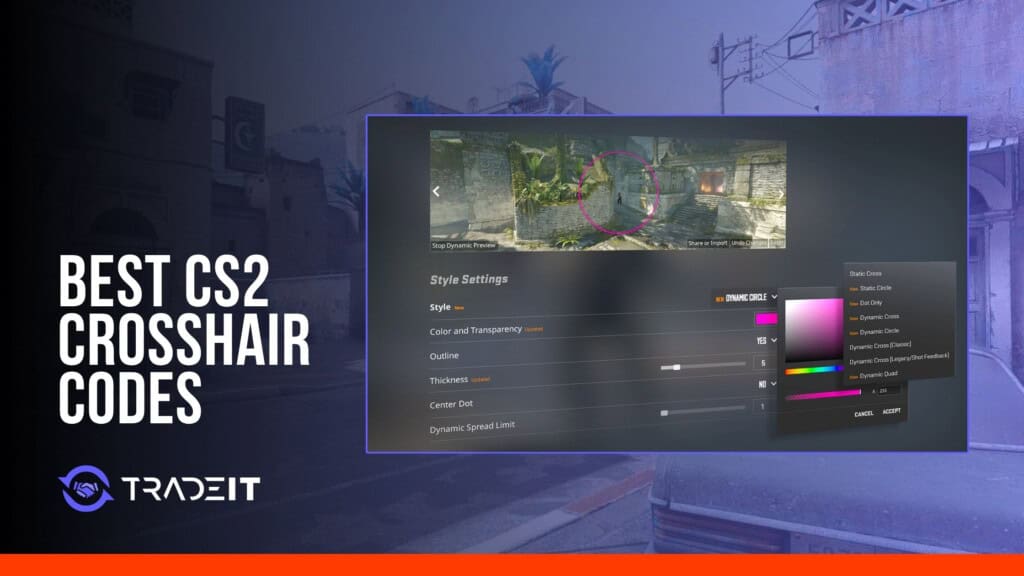
The tables collect 30 pro-associated presets and five creator presets previously published in this guide. They are not a live feed of anyone’s settings. To try one, copy the complete CSGO- string, open Settings > Crosshair/Scopes, choose Share or Import, and paste it.
Style, length, gap, thickness and color work together when adjusting a CS2 crosshair. Save the starting preset before changing individual values.
How to Import a CS2 Crosshair Code in 30 Seconds
- Open CS2 Settings, then select Crosshair/Scopes.
- Select Share or Import on the preview panel.
- Paste the complete share code and choose Import.
- Test it on the same resolution and aspect ratio you normally use.
Save your current code before importing another crosshair. That gives you a quick way back if the new shape is hard to see.
What Makes a Good CS2 Crosshair?
First decide how much visual feedback you want. Shape and recoil-following behavior are separate choices, so a static shape does not always mean the crosshair stays fixed on screen:
- Static: Keeps a fixed shape. Leave Follow Recoil off if you also want a fixed screen-center reference.
- Dynamic: Changes with movement and firing to give accuracy feedback.
- Follow Recoil: A separate setting that moves the crosshair with recoil, including when using a static shape.
Green and cyan are common starting colors, but compare them against your usual maps rather than assuming either will stand out everywhere. An outline can help when the base color blends into a wall.
The menu preview only tells you so much. Try a pale wall, a dark corridor and a busy fight with smoke in view. If you have to search for the crosshair before placing it, the color, opacity or outline needs attention. The opposite problem matters too: a bright, heavy shape may be easy to find while covering the detail you want to aim at.
Then compare thickness and gap together. Thin lines leave more of the target visible but can be harder to follow during a spray; thick ones trade some of that clear view for visibility. A tighter opening gives you a small reference to place, while a wider gap leaves more room around the target. Dynamic feedback can show accuracy changes during practice, whereas a static reference stays visually simpler. Choose the smallest readable setup, not simply the smallest number the menu allows.
How Resolution and Aspect Ratio Change What You See
Pixel dimensions rescale with resolution in CS2. For example, a thickness of 2 pixels set at 720p becomes 4 pixels at 1440p to keep the proportions. Stretching 4:3 to fill a widescreen monitor happens separately and can make the shape look wider. That’s why the useful comparison is on the resolution and scaling you normally play with.
Best Pro Player CS2 Crosshair Codes
These are earlier presets associated with the listed players. The ProSettings crosshair database may show a newer configuration, and an imported older code may not include every newer crosshair or scope option. Check the menu preview after import and save your own version.
Pro Crosshair Presets
| Player | Listed team | Earlier preset code | Preset note |
|---|---|---|---|
| donk | Team Spirit | CSGO-2uZLz-jXPTZ-SUkJx-dmJyv-UxQRO | Compare its center opening against a distant head-sized target. |
| ZywOo | Vitality | CSGO-KDOkV-jUpoE-GdhAh-YzbZL-MYXTB | Check visibility against bright and dark map surfaces. |
| NiKo | Falcons | CSGO-m89VO-6zPDr-53TJ9-OySAJ-V8Y2Q | Earlier NiKo-associated preset. His published profile now describes a colored Static Cross with no dot, not a white dot. |
| m0NESY | Falcons | CSGO-JV6Rw-9sfQB-UzokG-SHqBx-sbK5O | Judge it at your usual display scaling, not just in the preview. |
| sh1ro | Team Spirit | CSGO-bk5KR-52jw7-tKRaw-7kzdw-hOxoO | Compare it with your saved preset after a short practice session. |
| molodoy | FURIA | CSGO-Un9sK-tQVUX-avrUV-WXfxK-pBtdA | Compare its center opening against a distant head-sized target. |
| ropz | Vitality | CSGO-RLHnF-xbYw5-ZBiB5-MEOKJ-edK5O | Check visibility against bright and dark map surfaces. |
| Twistzz | FaZe Clan | CSGO-Q3Syz-WOaGL-9WTqW-9N3iJ-e64RG | Try taps and short bursts before adjusting the dimensions. |
| apEX | Vitality | CSGO-6fpYC-NBRGB-GH5TR-XHd6W-HVGOP | Judge it at your usual display scaling, not just in the preview. |
| flameZ | Vitality | CSGO-ANFqt-s6dDk-cZGKb-dMXSu-wzUrC | Compare it with your saved preset after a short practice session. |
| b1t | NAVI | CSGO-u2H9q-R3KDb-ijHuY-Bfizr-J9T8N | Compare its center opening against a distant head-sized target. |
| broky | FaZe Clan | CSGO-vBPqC-DXDO5-LxjkU-WBSvZ-9mUCP | Check visibility against bright and dark map surfaces. |
| Aleksib | NAVI | CSGO-XdLy4-rox9M-8hs4o-nBfTD-4uhCG | Try taps and short bursts before adjusting the dimensions. |
| malbsMd | Liquid | CSGO-MQYLm-nK5pN-DtXZW-KkmSV-OP3ED | Earlier malbsMd-associated preset. His published profile now records a white crosshair rather than the old green description. |
| kyousuke | Falcons | CSGO-eHZw3-8hCwT-qipDN-CHFWT-nQopQ | Compare it with your saved preset after a short practice session. |
| KSCERATO | FURIA | CSGO-uSeWF-F4v3i-yzDJ7-OEThH-CFCEB | Earlier KSCERATO-associated preset. His published profile now records a green crosshair, so do not treat this code as his live setup. |
More Pro Crosshair Presets
| Player | Listed team | Earlier preset code | Preset note |
|---|---|---|---|
| frozen | FaZe Clan | CSGO-fhT35-p4je7-fDqhM-U4xpR-TDhnL | Compare its center opening against a distant head-sized target. |
| YEKINDAR | FURIA | CSGO-F4wiZ-mSAUQ-QHqmj-nq42i-uTaUN | Check visibility against bright and dark map surfaces. |
| 910 | The MongolZ | CSGO-Cn2ZN-eMvFP-VMB4B-q8mAh-pzJzN | Try taps and short bursts before adjusting the dimensions. |
| magixx | Team Spirit | CSGO-3P8vG-eFro9-pvpiB-Ut7o3-dv6KQ | Judge it at your usual display scaling, not just in the preview. |
| w0nderful | NAVI | CSGO-wAD3c-ykt5L-zvZ98-vBisR-6sWPA | Compare it with your saved preset after a short practice session. |
| torzsi | MOUZ | CSGO-hP4eK-PqkTQ-jo4T7-cmpxc-ZHZML | Compare its center opening against a distant head-sized target. |
| xertioN | MOUZ | CSGO-USKR6-GFQxh-Mp4Wu-3PFHU-zj9aC | Check visibility against bright and dark map surfaces. |
| Spinx | MOUZ | CSGO-yn3PL-JSdWY-AUUW2-5iDcM-WiA6Q | Try taps and short bursts before adjusting the dimensions. |
| huNter- | G2 | CSGO-3q4Gs-VYeEJ-5hb2i-MDbqB-uvwPB | Judge it at your usual display scaling, not just in the preview. |
| HeavyGod | G2 | CSGO-pJhoH-GxJEF-FLEe3-KccZL-A4BYN | Compare it with your saved preset after a short practice session. |
| EliGE | Liquid | CSGO-9Xqnn-EfrJy-eq2pc-M8Yxa-zqLDR | Compare its center opening against a distant head-sized target. |
| NAF | Liquid | CSGO-J29Jc-WDCwx-VdLUG-szY5O-33LsE | Check visibility against bright and dark map surfaces. |
| siuhy | Liquid | CSGO-Xi4NX-WUD8O-kRLD7-JJrYj-EGnfO | Try taps and short bursts before adjusting the dimensions. |
| dev1ce | 100 Thieves | CSGO-jUj4R-WhF7m-G9Y5S-iLXzW-vMxoO | Judge it at your usual display scaling, not just in the preview. |
A small static cross in a contrasting color is a sensible first comparison. You don’t have to keep it just because a pro-associated preset uses it. Look for the aim point, then look through it at a distant target: both should be easy to see.
Import one code and take it through a short practice session. Try moving, stopping, tapping and spraying, then hold an angle with a target farther away. A shape that looked sharp in the menu may disappear during recoil or cover a distant head. Those are useful reasons to adjust it; one missed shot isn’t.
For a rifle, pay attention to bursts and distant angles. An AWP scope is a separate graphic, so copying an AWPer’s ordinary crosshair is not the same as copying their whole scoped setup.
Use the same resolution and practice routine for each comparison. Otherwise, you may be judging the display change rather than the crosshair. A player’s saved code is also just one version of their setup, not something they are obliged to keep.
Best CS2 Streamer Crosshair Codes
The creator codes below are earlier presets too. You can try the same starting shape without treating it as a claim about what that person uses in their next stream.
| Creator | Focus | Earlier preset code | Notes |
|---|---|---|---|
| fl0m | Streaming and Analysis | CSGO-8p2CH-CwUwH-yyHEA-SAORC-3dKTK | Compare its center opening against a distant head-sized target. |
| ohnePixel | Skins and Streaming | CSGO-KrnSy-ozhbX-qV9j8-qBzZT-ey3JE | Check visibility against bright and dark map surfaces. |
| olofmeister | Former Pro and Streaming | CSGO-PNhvT-E6JQu-8F7E7-x8QHp-zSNMB | Try taps and short bursts before adjusting the dimensions. |
| Pimp | Analysis and Streaming | CSGO-f6MJi-nKzU5-CTTpC-3iChw-CjEVF | Judge it at your usual display scaling, not just in the preview. |
| PashaBiceps | Streaming and Entertainment | CSGO-YSr63-7s4yj-MOrPe-Yjq6X-rXu6A | Compare it with your saved preset after a short practice session. |
Compare the new reticle against bright and dark weapon finishes before committing to a color.
Browse CS2 SkinsImport Troubleshooting and Manual Adjustments
Import a saved code:
- Open Settings
- Go to Crosshair/Scopes
- Click Share or Import
- Paste the code and confirm
Adjust individual settings:
The CS2 developer console is useful when you only want to change one value and leave the rest alone.
A share code belongs in Settings > Crosshair/Scopes > Share or Import, not in the console. Keep its CSGO- prefix and separators when you copy it.
With a cl_crosshair command, you enter a setting name and a value instead of an import code. Press Enter to apply it. Semicolons let you put several commands on one line, but start with one so you know what changed.
A rejected code may simply be an incomplete copy. Check the start and end of the string and remove stray spaces. There have also been changes to the share-code format for newer options. That is not evidence that every old preset fails, but a fresh export is worth requesting if yours won’t load.
How to Copy an Opponent’s Crosshair Mid-Match
- Press Tab to open the scoreboard.
- Select the player whose crosshair you want.
- Choose Copy Crosshair.
- Confirm that you want to replace the current setup.
Save a backup before copying another player’s crosshair. If that mode doesn’t offer the scoreboard option, the player can share a code with you instead.
How to Build Your Own CS2 Crosshair (Command Reference)
| Setting | Command | What It Does |
|---|---|---|
| Style | cl_crosshairstyle | 4: Static Cross; 6: Dot Only; 8: Static Square; 9: Static Quad. |
| Length | cl_crosshair_length | Bar length in pixels, rescaled when resolution changes. |
| Gap | cl_crosshair_gap | Spacing around the center. Its appearance depends on the chosen style. |
| Thickness | cl_crosshair_thickness | Bar width in pixels. |
| Outline | cl_crosshair_drawoutline | 0: off; 1: full; 2: half-outline. |
| Dot | cl_crosshairdot | 1 adds a center dot; 0 removes it. |
| Color | cl_crosshaircolor_r / cl_crosshaircolor_g / cl_crosshaircolor_b | RGB channels, each accepting 0 to 255. |
| Opacity | cl_crosshaircolor_a | Alpha: 0 is transparent and 255 is opaque. |
| Follow Recoil | cl_crosshair_recoil | 1 follows recoil; 0 switches that movement off. Separate from static/dynamic style. |
Keep an old CFG as a backup, not as a conversion chart for the newer CS2 console commands. The legacy cl_crosshairsize and cl_crosshairthickness values used different units. Entering those same numbers into the pixel controls won’t recreate the old dimensions.
With cl_crosshairstyle 4, you have a Static Cross to work on. Perhaps the bars are a good length but look too heavy: that’s a reason to lower thickness, not shorten them. Or perhaps the opening feels cramped, in which case try the gap. Working this way is easier than moving every slider and wondering which change helped.
Want cyan instead of green? Leave red at 0 and green at 255, then raise blue from 0 to 255. That changes the color, not its transparency, which belongs to cl_crosshaircolor_a. The outline has its own color controls. Add the dot if you would rather put a mark on the target than place it inside an empty opening.
Still moving during a spray, despite selecting a static shape? Follow Recoil is the other setting to check. Turn it off with cl_crosshair_recoil 0 to leave the static reticle at the center as you fire.
How to Choose the Right Crosshair for Your Playstyle
A distant opponent is a useful size comparison. If the head disappears under your crosshair, reduce what is covering it before trying a completely different preset. Up close, visibility may be the bigger problem: the tiny shape that left a distant target unobstructed can be hard to follow during a burst. An AWP’s scoped view needs a separate comparison because its scope graphic is not the ordinary crosshair.
A missed shot is not much of a diagnosis. Were you unable to find the crosshair, or was it hiding the head? The first problem points toward contrast; the second points toward dimensions. Give a preset a few sessions and adjust the thing that is actually getting in the way.
Trade, buy or sell CS2 skins on our marketplace.
Trade CS2 Skins on TradeitFAQ
Is crosshair style 4 really the best in CS2?
Only if that shape suits you. Style 4, Static Cross, leaves an opening between four arms. Dot Only removes the arms, Static Square puts a frame around the center, and dynamic styles supply accuracy feedback. None of those choices is a shortcut to better aim.
Does crosshair color affect visibility?
Yes, but there is no color that wins against every background. White may be clear in a dark corridor and disappear against a pale wall. Before abandoning a color you otherwise like, try an outline to separate its edge from the scenery.
Can I use different crosshairs for different weapons?
Not by importing several codes and assigning them to weapons. An import replaces the active setup. You can switch ordinary presets yourself or through binds, but a rifle code and a pistol code do not become an automatic pair.
Do CS2 pros use the default crosshair?
Published pro profiles show plenty of custom setups. That doesn’t make the default unusable. You need a visible aiming point and a clear view of the target, not necessarily a code with a famous name attached.
How do I make my crosshair follow recoil?
Use cl_crosshair_recoil 1. To undo that choice, enter cl_crosshair_recoil 0. A dynamic style can still change with accuracy even when Follow Recoil is off, so choose a static style too if your goal is a fixed reference at the center.
Do CS2 crosshair codes work in CS:GO?
A CSGO- prefix does not guarantee compatibility with the old game. CS2 kept the prefix and added options that CS:GO never had. A code exported from the newer client therefore cannot be assumed to work in the retired one.
What is the most popular CS2 crosshair style among pros?
Static Cross is common in published pro profiles, although the rest of the settings vary. Both players can use style 4 while one has a thin open cross and the other has heavier bars or a center dot. The style number alone won’t tell you what the finished crosshair looks like.
Does resolution affect how an imported crosshair looks?
A code carries settings, not a screenshot of how the crosshair looked on someone else’s monitor. CS2 rescales the pixel measurements for your resolution. If you also stretch 4:3 onto a widescreen display, that makes the whole picture wider. Compare both resolution and scaling when an import looks different from the one you expected.
Can I copy an opponent’s crosshair during a live match?
Yes, where Copy Crosshair is available on the player’s scoreboard entry. Confirming it replaces your setup. Save your own code before the match if you plan to try other players’ crosshairs; importing that backup is easier than rebuilding the old settings from memory.
How often do pro players change their crosshair codes?
It depends on the player. More importantly, a saved code won’t update when its owner makes a change. It holds the exported settings, so importing it again gives you that same version rather than downloading whatever the player uses now.