One of the biggest game-changers I found while practicing in Counter-Strike 2 is the ability to instantly clear smoke grenades. Having lingering smoke can seriously slow down your training when you’re refining smoke placements or practicing lineups.
Here’s how I set up the clear smoke command for a smoother, more efficient practice routine.
Table of Contents
Step 1: Enable the Developer Console
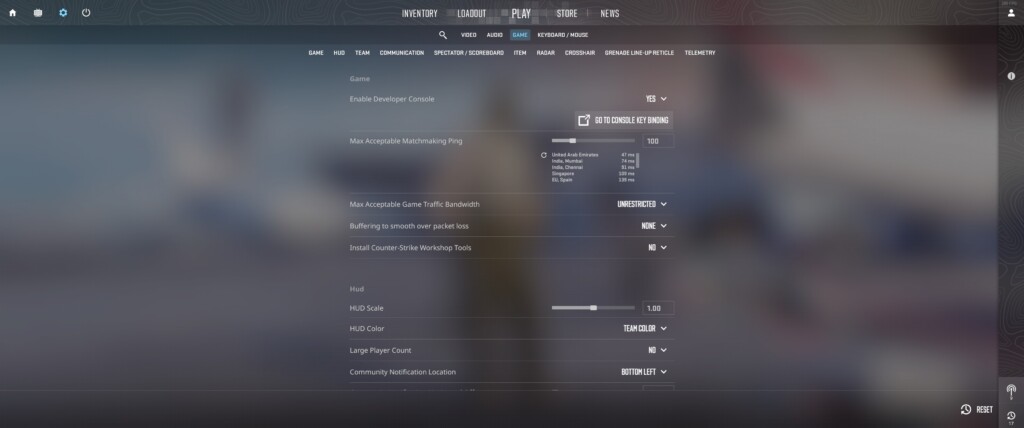
First things first, to run any commands in CS2, you need the developer console. If it’s not already enabled, here’s a quick setup:
Go to the in-game Settings menu.
Navigate to the Game tab.
Set Enable Developer Console (~) to Yes.
Once enabled, you can open the console anytime by pressing the ~ key (right below your Esc key). It’ll quickly become one of your best tools.
Step 2: Allow CS2 Commands with sv_cheats
To use the smoke-clearing command, you’ll need to enable cheats in your game, which unlocks several useful commands for practice:
Press ~ to open the developer console.
Type sv_cheats 1 and press Enter.
This step is essential since many practice commands only work with cheats enabled. However, this can only be used in offline or custom matches. In competitive games, it is neither allowed nor possible.
Also Check: Infinite Money CS2 Command
Step 3: Set Up the Clear Smoke Command
Here’s where things get practical. I bind a key to instantly clear smoke grenades and stop the smoke sounds. It saves time and keeps you focused on what you’re testing:
Enable and open the developer console in-game.
Enter:
bind [key] "ent_fire smokegrenade_projectile kill; stopsound"
Replace [key] with whatever key is convenient for you. I usually go with something like n or m, but it’s up to you. With this binding, you press the key anytime you want to clear all active smoke on the map instantly.
Also Check: CS2 Smokes – Complete Guide
Why It Is Useful in Practice
With the clear smoke command set up, here’s how I use it in my training sessions:
Throw a smoke grenade to observe how it lands and spreads.
Press your bound key to instantly remove the smoke.
Refine your aim or positioning and repeat the process for consistency.
This simple setup lets you quickly iterate on different smoke positions and lineups without waiting around for the smoke to clear naturally. It’s a huge time-saver and helps you dial in your smokes fast.
Other Useful CS2 Practice Commands
These commands are commonly used in offline or custom matches (with sv_cheats 1) to improve utility practice, movement, and overall game understanding.
| Practice Feature | Command | What It Does |
|---|---|---|
| Infinite Warmup | mp_warmup_end + mp_warmuptime 9999 | Extends or controls warmup time for unlimited practice |
| Grenade Trajectory | sv_grenade_trajectory 1 | Shows grenade flight path for lineup training |
| Rethrow Last Grenade | sv_rethrow_last_grenade | Replays your last thrown grenade to study its behavior |
| Enable Cheats | sv_cheats 1 | Activates cheat-only practice commands |
Summary
Setting up the CS2 clear smoke command has completely changed how I practice. By binding a key to clear smoke instantly, I’m able to focus on perfecting my throws and refining my skills without unnecessary delays.
FAQs
How do you clear smokes instantly in CS2?
To instantly remove smoke grenades:
- Enable the developer console
- Activate cheats with <code>sv_cheats 1</code>
- Bind a key using:
<code>bind [key] “ent_fire smokegrenade_projectile kill; stopsound”</code>
Pressing that key will clear all active smokes immediately.
What command makes smoke disappear faster in CS2?
Use the following command in the console:
- <code>ent_fire smokegrenade_projectile kill</code>
This removes all active smoke grenades from the map instantly.
How can you counter smokes in CS2?
You can counter smokes by:
- Throwing HE grenades to temporarily disperse them
- Shooting through smoke to create brief visibility gaps
These methods help you spot enemies or create openings.
What is the command to clear Molotovs in CS2?
To remove Molotov fire effects:
- Enable cheats with <code>sv_cheats 1</code>
- Use the command:
<code>ent_fire molotov_projectile kill</code>
This will instantly extinguish all active Molotov flames.
Can you see through Molotov flames in CS2?
Not directly. Molotov flames are designed to block vision, but:
- Lowering graphics settings may slightly reduce visual intensity
- Visibility improvements are minimal and situational
Molotovs remain effective for area denial and vision control.
Why does the clear smoke command not work on VAC-secured servers?
The command doesn’t work on VAC servers because it requires sv_cheats 1, which is disabled in all official matchmaking environments. VAC-secured servers enforce fair play rules, so cheat-enabled commands like ent_fire are blocked to prevent abuse and maintain competitive integrity.
How do I remove or disable the smoke clear bind?
You can disable it by opening the console and typing:
unbind [key]
This removes the command from the selected key completely.
How do I reset all custom binds if I made a mistake?
You can reset binds using:
unbindall (removes all key binds)
Then reconfigure your controls manually in settings or via console.
5. Why is sv_cheats 1 required for this command?
sv_cheats 1 is required because the command manipulates in-game entities (like smoke grenades) directly. Valve restricts this to prevent exploitation in online matches and ensure fair gameplay.