Opening cases is one of the most exciting parts of Counter-Strike 2. Many players enjoy collecting skins, chasing rare knives, or simply experiencing the thrill of seeing what item they might unlock next.
Over time, however, it’s easy to lose track of how many cases you’ve actually opened. If you’ve been playing for years, that number can become surprisingly large.
Unfortunately, CS2 does not include a built-in counter that directly tells you how many cases you’ve opened. However, there are a few ways to estimate or track this number using your Steam data.
Table of Contents
Checking Your Steam Inventory History
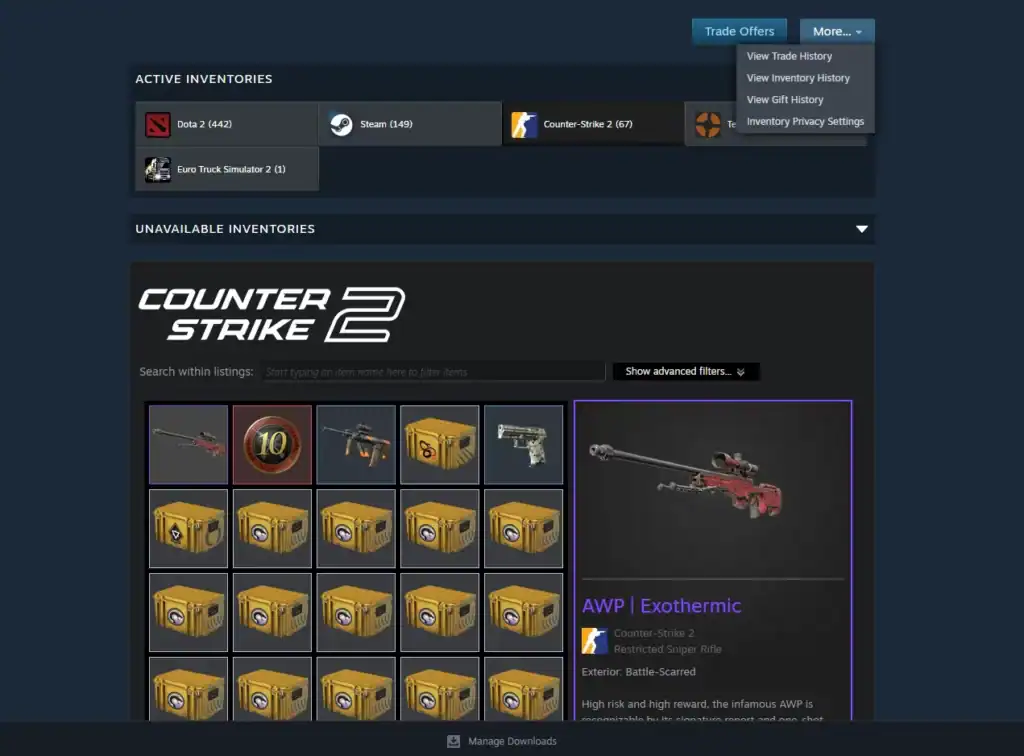
One of the easiest ways to see how many cases you’ve opened in CS2 is by reviewing your Steam Inventory History.
Every time you open a case, the event is recorded as a transaction where the case is consumed and a skin is added to your inventory. To access this information:
Launch Steam and navigate to your profile page from the main client interface.
Open the Inventory section where all your CS2 skins, cases, and items are stored.
Click More → View Inventory History to see a record of cases opened and items received.
Inside the inventory history page, you can scroll through your activity and look for entries showing cases being opened. These entries typically display the case being removed from your inventory and the skin you received in return.
While this method works, it can be difficult if you’ve opened hundreds or thousands of cases, since Steam only shows the history chronologically and not as a summarized count.
Estimating the Number Manually
If you prefer not to use external tools, you can estimate your case openings manually by reviewing your market purchases and keys used.
Most players buy keys from the Steam store before opening cases. If you look at your Steam purchase history, you may be able to count how many keys you’ve purchased for CS2 over time.
Since each case requires one key to open, the number of keys you’ve used can provide a rough estimate of how many cases you’ve opened.
This method is not always perfect because you may have:
You may have purchased keys but never actually used them to open cases.
Keys might have been traded with other players instead of being used for case openings.
Some cases may have been opened using keys obtained through trades with other players.
Still, it can give you a general idea of your case opening history.
Tracking Case Openings Going Forward
Because CS2 does not officially track case openings, many players choose to track their activity themselves.
If you want to keep accurate records in the future, you can simply log each case opening in a spreadsheet or use community tracking tools designed for collectors.
Keeping track of your case openings can help you understand how much you’ve spent, what skins you’ve obtained, and whether opening cases has been worth it for you.
Summary
While Counter-Strike 2 does not currently show the total number of cases you have opened, there are still several ways to estimate this number.
By checking your Steam inventory history or reviewing your key purchase history, you can get a fairly accurate idea of your case opening activity.
For many players, discovering how many cases they’ve opened can be surprising and sometimes a little shocking. Regardless of the number, case openings remain one of the most memorable parts of the CS2 experience.
FAQs
1. Can you see the exact number of cases you’ve opened in CS2?
No, Counter-Strike 2 does not currently display an exact counter showing how many cases you’ve opened. Players must estimate the number using their Steam inventory history, purchase records, or third-party tracking tools.
2. Where can I check my case opening history in Steam?
You can check it through your Steam Inventory History. Go to your profile, open Inventory, click More, and select View Inventory History. This page shows all item changes, including cases opened and the skins received.
3. Can I estimate case openings by counting keys purchased?
Yes, reviewing your Steam purchase history for CS2 keys can give a rough estimate. Since each case requires one key to open, the number of keys purchased can approximate how many cases you opened, though trades and unused keys can affect accuracy.
4. Is there a way to track case openings automatically in CS2?
Not directly within the game. If you want precise tracking, you can keep a personal log, use spreadsheets, or rely on third-party tools that monitor inventory changes and case openings over time.