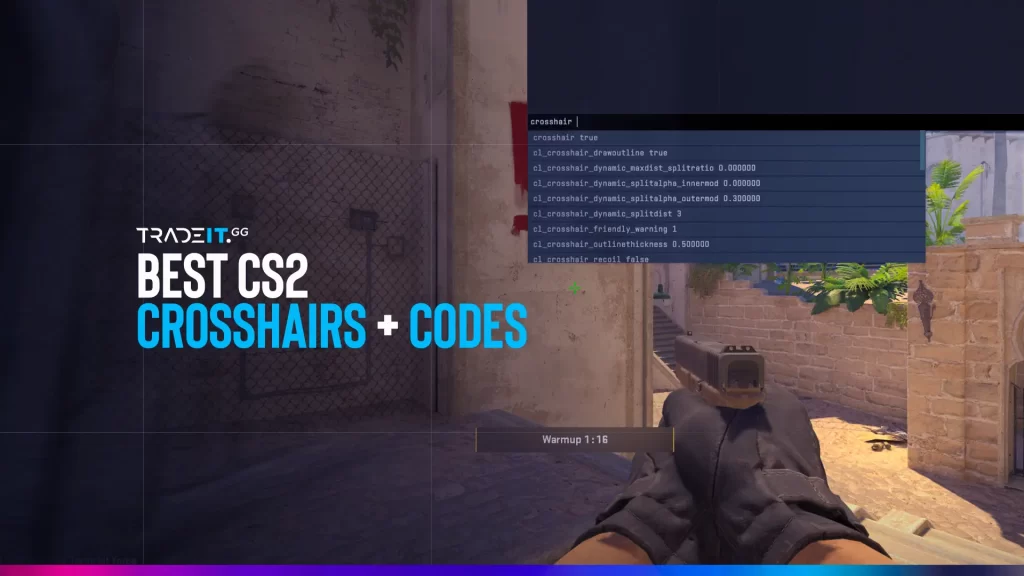
A good CS2 crosshair can make your aim feel cleaner, faster, and more consistent, but there is no single perfect option for everyone. The best crosshair depends on how you play, what weapons you use most, and how much visual feedback you want while shooting.
This 2026 guide focuses on popular crosshair codes from pro players and streamers, plus simple advice on how to choose the right style for rifling, AWPing, entry play, and support roles. Because crosshair codes can change over time, it is better to treat this as a curated current list, not a permanent database.
Best CS2 Crosshair Codes for Pros & Streamers (2026)
| Player | Crosshair Code | Why Try It |
|---|---|---|
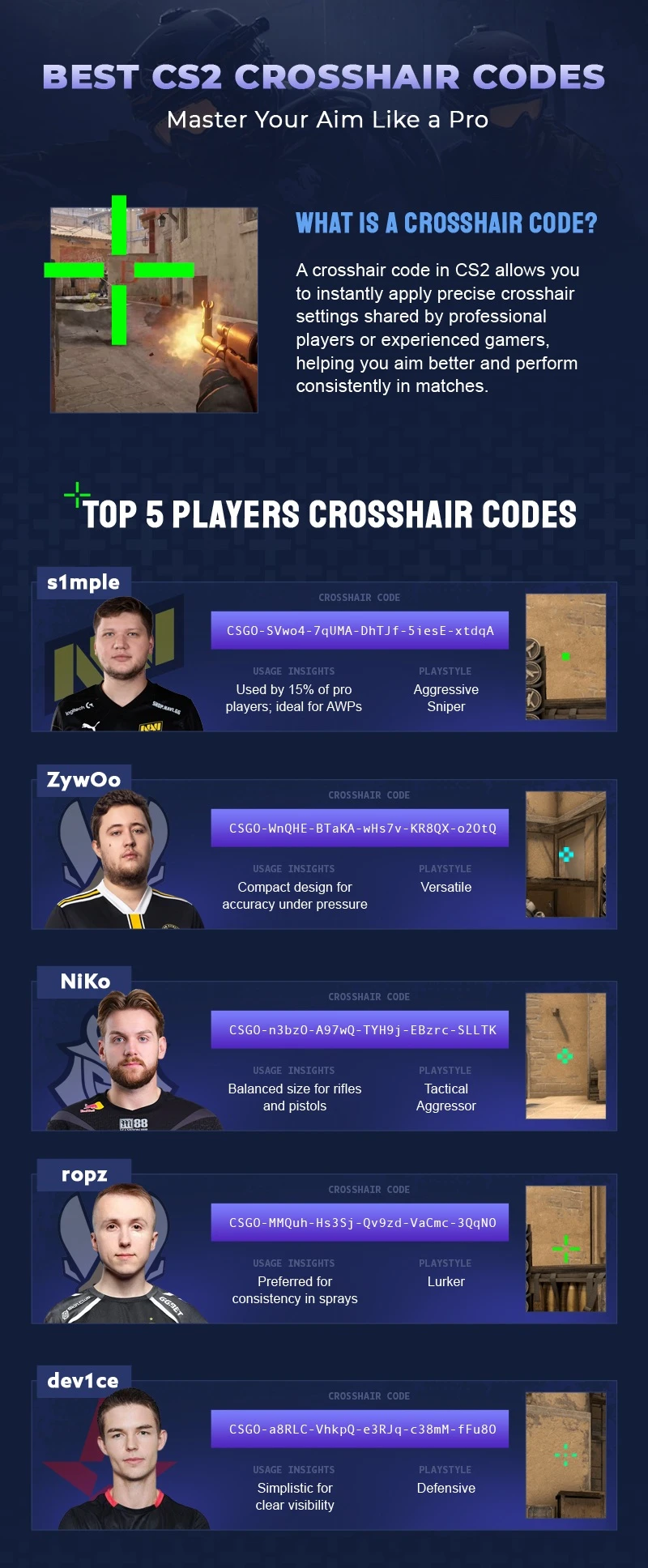
| ZywOo | CSGO-FNOLG-fQcPX-V8P7K-VqtAf-ZbJaA | Small, clean static crosshair with a tight gap. Great starting point for players who want a simple all-round setup. |
| s1mple | CSGO-E8xcE-27Lmw-2ipNt-3HZvp-pevvE | Clean and controlled setup for players who want a no-nonsense crosshair. The latest recorded entry there is from November 30, 2025. |
| NiKo | CSGO-AkTYm-syAcf-UKom7-tGKdM-mOJvM | Compact, disciplined rifler crosshair. Strong fit for headshot-heavy players and sharp crosshair placement. |
| dev1ce | CSGO-Jhfkc-4UpR6-DJftC-VfGek-pL3ED | Clean and controlled setup for players who want a no-nonsense crosshair. Latest recorded entry there is from November 30, 2025. |
| ropz | CSGO-5UHEt-3RFCY-4Nu8t-4UYGQ-vJN2G | Slightly larger but still minimal. Good for precise riflers who want readability without extra clutter. |
| donk | CSGO-HqNCm-zmBvH-eAd4P-hr5Dx-UJAfD | Very current compact rifler setup with a tight gap and solid structure. Great for aggressive aimers. |
| m0NESY | CSGO-Xu7jD-Q8hte-wC6jj-eYmth-mRFuA | Strong modern AWPer template with a clean static feel and good visibility. |
| sh1ro | CSGO-RFou6-PMweG-r8vJc-ro5qh-dAHnK | Useful for players who like a minimal dot-style setup that works for both rifling and AWPing. The latest recorded entry there is from February 7, 2026. |
Note: These codes can change over time, so this list should be treated as a current 2026 snapshot rather than a permanent database.
Understanding CS2 Crosshairs
Your crosshair is the center of your aim – literally. In CS2, it helps you line up headshots, control recoil, and quickly flick targets.
From thickness to color, every little detail matters. That’s why using a professional-level or customized crosshair can help you aim faster and shoot more accurately.
Even the best professional players and popular streamers have specific crosshair settings that match their unique playstyles.
Types of Crosshairs in CS2
There are three primary types of crosshairs:
- Dynamic crosshairs are a feature that offers players valuable feedback as they adapt and respond to their movements and shooting actions, expanding or contracting accordingly.
- Static crosshairs: These remain consistent and don’t change during gameplay.
- Hybrid crosshairs: These combine static and dynamic elements.
The easiest way to understand CS2 crosshairs is to group them by behavior. Most players end up choosing a static option, but dynamic and hybrid styles still help some players learn spray feedback or movement mistakes.
Style 4 remains one of the most common choices among pros because it gives a clean static look, but the best option still depends on your own aim habits and visual preference.
| Crosshair Type | Description | Recommended For |
|---|---|---|
| Static | Doesn’t change while moving/firing | AWPers, Riflers |
| Dynamic | Expands during movement or shooting | Spray control learners |
| Hybrid | Mix of both; customizable | Intermediate & advanced players |
Customization Options
Customization holds the key to finding the perfect crosshair for CS2. You have the freedom to modify various aspects of your crosshair, including:
Bright green, pink, and yellow are the preferred crosshair colors for professional players. These colors enhance visibility against various backgrounds. However, the compact cyan crosshair has gained remarkable popularity due to its unique color and minimalist design.
Enhancing your crosshair is easily attainable through console commands or in-game settings, granting you complete autonomy over your aiming experience.
Most Used Crosshair Colors by Pros (2026)
- Cyan (S1mple, Shroud)
- Green (ZywOo)
- Yellow (dev1ce, PimpCSGO)
- White (Stewie2k)
These colors are chosen for maximum visibility across different maps and lighting conditions.
Best Crosshair CS2 Settings Used by Pro Players
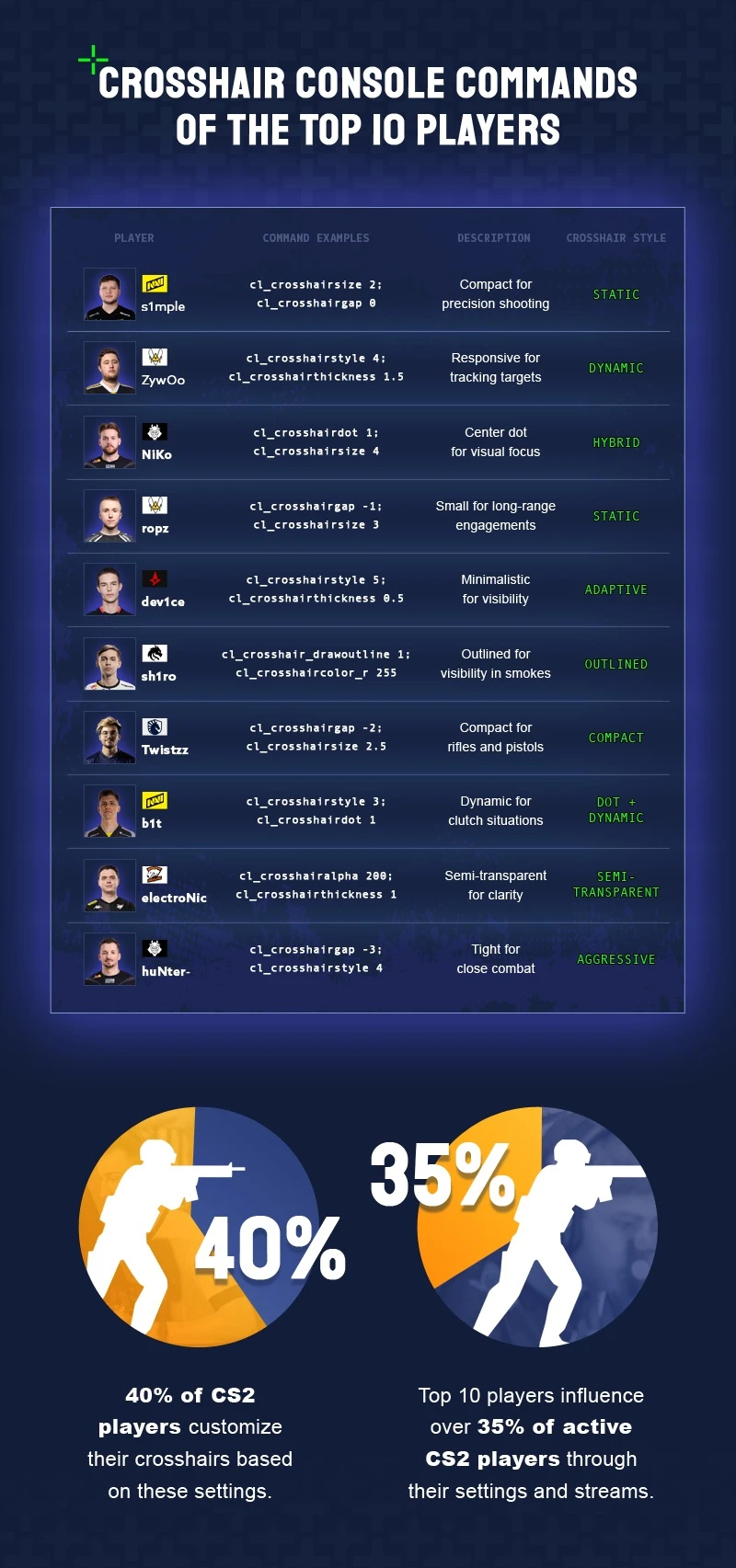
Pro crosshairs are useful because they give you proven starting points, but they are not magic aim boosters. The best way to use them is as templates.
Most top players still prefer small static crosshairs with clean lines, a tight gap, and colors that stay visible across different maps. From there, the details change based on role, comfort, and personal preference.
Instead of copying a huge list of exact settings that can go outdated fast, start with a few reliable pro styles and adjust them to your own screen, resolution, and playstyle.
1. ZywOo – Team Vitality
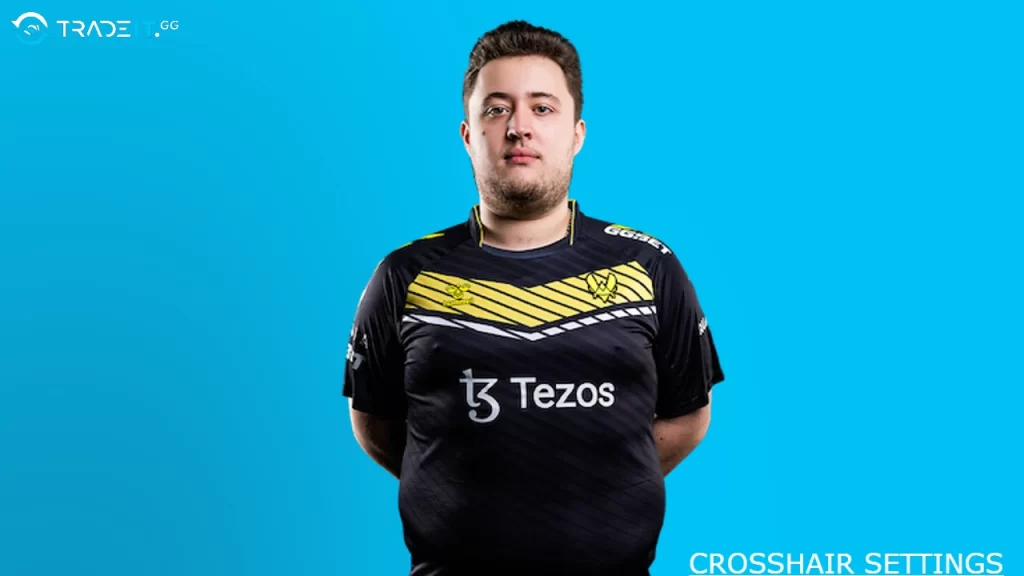
ZywOo is one of the safest pros to copy if you want a small, clean, readable crosshair. His setups usually stay minimal and balanced, which makes them easy to test whether you rifle, AWP occasionally, or just want something dependable.
- Best for: all-round players who want a clean static crosshair
- Why try it: simple, controlled, easy to read in most situations
A talented member of Team Vitality in professional CS2 is widely recognized for his exceptional rifling abilities. His gameplay embodies the use of a thin green crosshair devoid of outlines and featuring a subtle gap in the center. This strategic choice optimizes visibility and enhances accuracy during intense gaming sessions.
Import in CS2 or paste the below ZywOo’s command in the console:
cl_crosshairalpha 255
cl_crosshairdot 0
cl_crosshairgap -3
cl_crosshairsize 2
cl_crosshairstyle 4
cl_crosshairthickness 0
cl_crosshair_drawoutline 0
cl_crosshair_sniper_width 1
cl_crosshaircolor_b 144
cl_crosshaircolor_g 238
cl_crosshaircolor_r 0
| ZywOo CS2 Crosshair Settings & Code: | CSGO-ywh69-Ys549-BMc7Y-79HEq-J6sKG |
| Crosshair Style | 4 |
| Center Dot | Disabled |
| Length | 1.5 |
| Crosshair Thickness | 0 |
| Gap | -3 |
| Outline | Disabled |
| Red | 0 |
| Green | 238 |
| Blue | 144 |
| Alpha | On, 200 |
2. s1mple – Natus Vincere
s1mple’s crosshair style is usually a good starting point for players who move between rifling and AWPing. His preferences tend to stay clean and practical without adding unnecessary visual clutter.
- Best for: hybrid players, riflers who also AWP
- Why try it: good balance between visibility and precision
S1mple, a highly regarded rifler from Ukraine, stands out as one of the best in the world. He proudly represents Na’Vi, an esteemed esports organization.
Import in CS2 or paste the below s1mple’s command in the console:
cl_crosshairalpha 255
cl_crosshairdot 0
cl_crosshairgap -3
cl_crosshairsize 1
cl_crosshairstyle 4
cl_crosshairthickness 1
cl_crosshair_drawoutline 0
cl_crosshair_sniper_width 1
cl_crosshaircolor_b 250
cl_crosshaircolor_g 250
cl_crosshaircolor_r 250
| s1mple CS2 Crosshair Settings & Code: | CSGO-5JoAp-27by7-EhuBB-nUcq3-3uWPA |
| Crosshair Style | 5 |
| Center Dot | Enabled |
| Length | 1 |
| Crosshair Thickness | 1 |
| Gap | -3 |
| Outline | Disabled |
| Red | 255 |
| Alpha | On 255 |
3. NiKo – G2 Esports
NiKo is one of the best references for riflers who care about first-bullet accuracy, head-level placement, and tight aim. If you want a compact setup built around sharp rifle play, his style is always worth testing.
- Best for: riflers, entry fraggers, headshot-heavy play
- Why try it: tight and disciplined feel for aggressive rifle aim
Import in CS2 or paste the below Niko’s command in the console:
cl_crosshairalpha 255
cl_crosshairdot 0
cl_crosshairgap -3
cl_crosshairsize 2
cl_crosshairstyle 4
cl_crosshairthickness 0
cl_crosshair_drawoutline 0
cl_crosshair_sniper_width 1
cl_crosshaircolor_b 255
cl_crosshaircolor_g 255
cl_crosshaircolor_r 255
| Niko CS2 Crosshair Settings & Code: | CSGO-LdXHk-hatWX-JjEa8-tuLDN-5tbJD |
| Crosshair Style | 4 |
| Center Dot | Disabled |
| Length | 1.5 |
| Crosshair Thickness | 0 |
| Gap | -3 |
| Outline | Disabled |
| Red | 255 |
| Green | 255 |
| Blue | 55 |
| Alpha | On, 255 |
📦 Tip: Want more styles? Use a Workshop Map like “Crashz Crosshair Generator” to preview dozens of styles in real time before importing.
4. dev1ce – Astralis
dev1ce remains a strong example of a neat, no-nonsense crosshair. Players who want a clean and consistent setup without anything flashy often end up liking this style.
- Best for: disciplined players, AWPers, controlled riflers
- Why try it: simple setup that stays readable under pressure
Known widely for his exceptional AWP skills in the history of Counter-Strike, he is an integral member of Astralis. His choice of a smaller yellow crosshair enables intermediate to advanced players to achieve pinpoint precision and accuracy across all distances.
Import in CS2 or paste the below dev1ce’s command in the console:
cl_crosshairalpha 255
cl_crosshairdot 1
cl_crosshairgap -3
cl_crosshairsize 1
cl_crosshairstyle 4
cl_crosshairthickness 0
cl_crosshair_drawoutline 0
cl_crosshair_sniper_width 1
cl_crosshaircolor_b 170
cl_crosshaircolor_g 255
cl_crosshaircolor_r 0
| dev1ce CS2 Crosshair Settings & Code: | CSGO-ue57B-RNCCw-8URMu-dHkb6-5pZQM |
| Crosshair Style | 4 |
| Center Dot | Enabled |
| Length | 2 |
| Crosshair Thickness | 0 |
| Gap | -3 |
| Outline | Disabled |
| Red | 0 |
| Green | 255 |
| Blue | 170 |
| Alpha | On, 255 |
5. ropz
ropz is a strong choice for players who want something compact and modern. His style usually fits players who prefer precision, patience, and minimal distraction on screen.
- Best for: lurkers, precision riflers, methodical players
- Why try it: clean feel with very little visual noise
6. donk
donk is one of the most relevant players to include in a real 2026 update. His crosshair is worth trying if you like modern rifler setups that feel fast, sharp, and built for high-tempo aim.
- Best for: aggressive riflers, confident aimers
- Why try it: current pro reference with a modern compact style
7. m0NESY
m0NESY is another important 2026 reference, especially for players who want a current elite AWPer setup rather than only older legacy names. His style is useful if you want something built around fast reactions and clean tracking.
- Best for: AWPers, flick-heavy players
- Why try it: modern elite AWPer reference
8. sh1ro
sh1ro’s style is a good option for calm, controlled players who want a crosshair that stays readable without feeling bulky. It is often a strong fit for players who value precision over flashiness.
- Best for: patient riflers, AWPers, anchor players
- Why try it: steady, controlled feel
Popular Streamer Crosshair Settings
Let’s take a look at the crosshair choices used by some of the biggest CS2 streamers like Shroud, Stewie2k, and PimpCSGO. These creators are still copied because their crosshairs are usually easy to see, easy to test, and simple to understand.
Streamer crosshairs are useful because they often reflect more comfort-focused playstyles rather than strict tournament setups. They can be a better fit for casual grinding, aim training, or experimenting with something more visible.
1. Shroud
Shroud, a former professional CS2 player who now streams his gameplay, has gained widespread recognition for his exceptional aim and lightning-fast reflexes. His crosshair settings are particularly notable featuring a large cyan crosshair devoid of outlines or a central dot, with a subtle gap in the center.
This unique setup ensures excellent visibility across various environments and facilitates rapid target acquisition.
Shroud crosshair code: CSGO-DbrRD-BX8kL-fmQhq-cRuEt-KfTOG
Import in CS2 or paste the below Shroud’s crosshair command in the console:
cl_crosshairalpha 255
cl_crosshairdot 0
cl_crosshairgap -2
cl_crosshairsize 5
cl_crosshairstyle 1
cl_crosshairthickness 1.5
cl_crosshair_drawoutline 1
cl_crosshair_sniper_width 2
cl_crosshaircolor_b 250
cl_crosshaircolor_g 250
cl_crosshaircolor_r 250
2. Stewie2k
Stewie2k, a prominent CS2 streamer, chooses to use a larger and more visible white crosshair. This crosshair does not have a center dot and has a small gap in the middle. By opting for this particular setup, Stewie2k ensures excellent visibility and precision.
It is an ideal choice for players who desire a more noticeable crosshair without compromising accuracy.
Stewie2k crosshair code: 0;P;o;1;f;0;0l;3;0o;5;0a;1;0f;0;1t;0;1l;0;1o;0;1a;0;1m;0;1f;0
Import in CS2 or paste the below Stewie2k’s crosshair command in the console:
cl_crosshairalpha 255
cl_crosshaircolor 1
cl_crosshairdot 0
cl_crosshairgap -3
cl_crosshairsize 2
cl_crosshairstyle 4
cl_crosshairthickness 1
cl_crosshair_drawoutline 0
cl_crosshair_sniper_width 1
3. PimpCSGO

PimpCSGO, a skilled streamer renowned for his exceptional gameplay, opts for a large-sized yellow crosshair devoid of outlines and a center dot. With its minimal gap, this particular crosshair setup proves to be ideal for beginners.
By offering enhanced visibility and precision, it empowers novice players to refine their aiming and tracking abilities.
Import in CS2 or paste the below PimpCSGO’s crosshair command in the console:
cl_crosshairalpha 250
cl_crosshaircolor 1
cl_crosshairdot 1
cl_crosshairgap 0
cl_crosshairsize 3
cl_crosshairstyle 5
cl_crosshairthickness 1
cl_crosshair_drawoutline 1
cl_crosshair_sniper_width 1
How to Import CS2 Crosshair Codes
Trying out new crosshair settings and finding the perfect setup for your gameplay can be made easier by importing crosshair codes from professional players and streamers. Simply copy and paste the code into the game’s console to import a crosshair code.
A pro crosshair should be your starting point, not your final answer. When testing one, adjust only a few things at a time:
- color
- size
- gap
- thickness
If a crosshair feels close but not perfect, do not throw it out immediately. Small changes often matter more than switching to a totally different style.
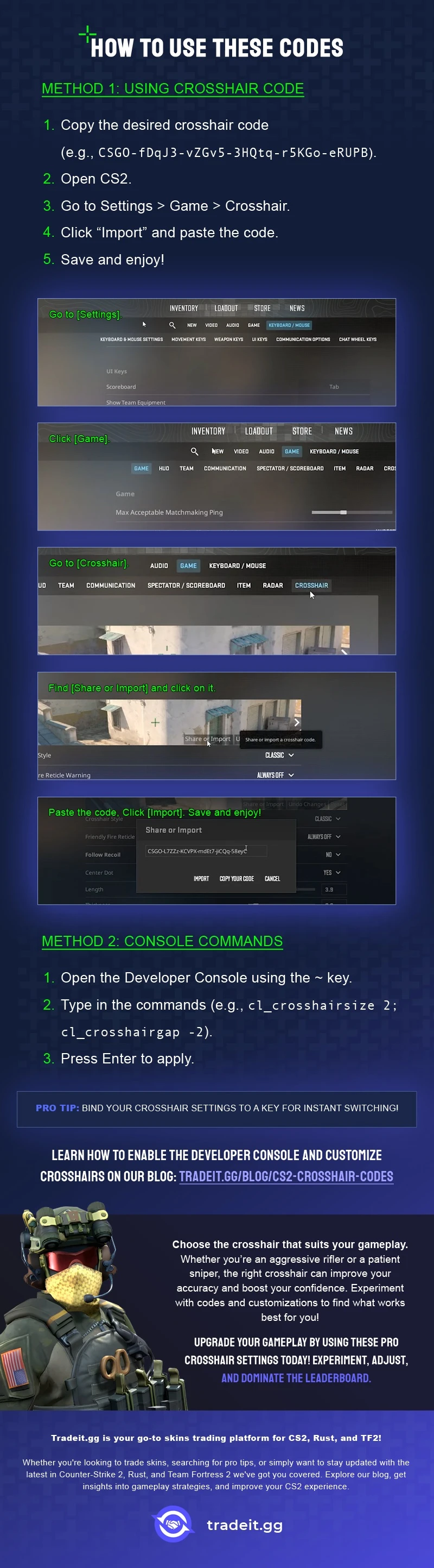
To ensure a smooth process, please remember to follow these steps when importing a new crosshair code:
Method 1: Using the Settings Menu (Simpler)
- Open CS2 and navigate to the main menu.
- Click on the “Settings” icon (usually a gear symbol) in the top left corner.
- In the Settings menu, click on the “Game” tab.
- Select “Crosshair” from the options on the left side.
- In the bottom right corner of the crosshair preview window, you’ll see a button labeled “Share or Import.” Click on it.
- A new window will pop up. Paste the desired crosshair code into the empty box.
- Click “Import” to apply the code to your crosshair settings.
Method 2: Use console commands manually
If you are working from raw cl_crosshair... commands instead of shared code, open the developer console and paste the command set there.
For modern share/import crosshair codes, the in-game Share or Import option is usually the easier method.
- Open CS2 and navigate to the main menu.
- Go to “Settings” and then “Game” as in Method 1.
- Locate the option for “Enable Developer Console” and set it to “Yes.”
- Press the
~key (usually located next to the Esc key) to open the developer console. - Copy the crosshair code you want to use.
- Paste the code directly into the console and press Enter.
Best Approach for 2026
For most players, the smartest workflow is:
- Start with a clean pro-style crosshair
- Test it in Aim Maps, DM, and a few real matches
- Adjust the color for visibility
- Adjust the size and gap for your aim style
- Stick with it long enough to judge it properly
That gives you a much better result than copying random codes every few days
Customizing Your Crosshair
Your crosshair should help you, not get in your way. That’s why it’s worth taking 5–10 minutes to tweak it until it fits you.
Give a new crosshair a fair test window before switching again. If you change too often, it becomes harder to tell whether your aim is improving or your settings are just unfamiliar.
Want step-by-step help? Check our in-depth guide: “How to Change Crosshair in CS2,” a guide on customizing your crosshair using console commands and workshop maps, allowing you to elevate your aiming skills to the next level.
Best Crosshair Types by Role
And keep the AWPer / Entry / Support / Lurker structure, but make it cleaner:
☑️Lurker: tight crosshair for shoulder peeks and pixel-angle fights
☑️AWPer: small static crosshair or tiny dot
☑️Entry fragger: compact crosshair with strong visibility
☑️Support: bright color and easy readability in chaotic fights
Visibility
Your crosshair should never blend into the map.
That’s why using a color like bright green, pink, cyan, or yellow will help your aim stay sharp. These colors are easy to spot on most CS2 maps.
Here’s what you want:
✔️ A color that pops
✔️ A shape that doesn’t distract
✔️ A size that fits how you aim
Stick with something clean, simple, and test it out in real matches or aim maps.
Precision
Being able to aim fast isn’t enough; you also need to be accurate.
Crosshair Best Practices
Crosshair Size Recommendations
Play around with the gap and thickness until your crosshair helps, not hurts your shooting.
Summary
A good crosshair can absolutely make CS2 feel cleaner and more consistent, but the best setup is the one that matches your own aim habits, not just your favorite player’s settings.
In 2026, the safest way to use pro and streamer crosshairs is to treat them as templates. Start with a current pro-style crosshair, then adjust the size, gap, color, and thickness until it feels natural on your setup.
Frequently Asked Questions
How do I get a crosshair code in CS2?
Use the in-game Share or Import option in the Crosshair menu, then paste the code there. For raw cl_crosshair... commands, use the developer console instead.
What is the best crosshair for beginners?
A small, static crosshair with a simple color and no extra clutter is usually the easiest place to start. Many players begin with a Style 4 setup and adjust from there.
What are the best crosshair settings for different weapons?
Snipers often prefer small, thin crosshairs for accuracy. Rifle players may choose slightly wider styles for better spray control.
Which crosshair type do most pro players use?
Most pros still lean toward small static crosshairs, but there is no single universal setup. Size, gap, and color vary a lot from player to player.
Should I copy a pro crosshair exactly?
It is a good starting point, but you should still adjust it to your own monitor, resolution, and role. The best crosshair is the one that helps you aim comfortably and consistently.
Do crosshair codes change over time?
Yes. Pro players sometimes change their crosshair settings, which is why a curated current list is more reliable than a huge permanent code dump.
How can I customize my crosshair in CS2?
Use in-game settings, console commands, or workshop maps like crashz’s Crosshair Generator to tweak your crosshair.
What is the optimal crosshair thickness?
Thin crosshairs are better for precise weapons like snipers. Thicker ones can help when spraying with rifles or SMGs.
Can I use multiple crosshairs in-game?
Yes. You can save different crosshairs as config files or use workshop maps to switch between styles easily.
Does the crosshair change with weapons in CS2?
No. CS2 uses your chosen crosshair for all weapons unless you manually switch it or use a different config.